So after my last post I was determined to stay true to my goal of reading a book a week. The first book I chose was a 472 page monster by Fountas and Pinnell, Literacy Beginnings: A Pre-Kindergarten Handbook. Things were going along well until all the wedding craziness hit surrounding my sister's wedding. As the maid of honour, I hosted a rehearsal party, party after the wedding, and numerous house guests. So needless to say I didn't get a lot of reading accomplished, and the wedding week was an absolute blast with my family and friends!
Photo credit: Carleigh Babiak Photography (and she's one of my fabulous kindergarten moms)
I got back on track this week, and finished Fountas and Pinnell yesterday. I also cranked out a second book while tanning on the deck. Here's my thoughts so far...
Literacy Beginnings: A Pre-Kindergarten Handbook by Fountas and Pinnell
-nice design--yellow tabs separate each section which makes it easy to flip to what you're looking for
-not as overwhelming as it sounds to read as over 200 pages of the book is dedicated to appendices
-this book was easy to understand and made a lot of sense. I'd recommend it for Canadian kindergarten teachers as well as pre-kindergarten/junior kindergarten educators.
-pages of full colour photographs of classrooms, play areas, etc
-I thought the authors presented a balanced approach--it's not about taking away playtime and social training, but instead infusing it with literacy. That made a lot of sense to me.
-Fountas and Pinnell also addressed the "readiness" view that many educators still believe. Children CAN and will benefit from exposure to rich literacy experiences regardless of their developmental stage and how many letters they can recognize or print.
-letter knowledge is necessary to learn to read, but it alone is not enough for a child to become a reader and writer.
-addressed the severe limitations of "letter of the week" practices in kindergarten
-they advocate inquiry-based learning (I already do a lot of project-based learning) as this approach enables young children to learn how to learn.
-cited research that states the number of books available to children in a classroom should be five times the number of children in the class (20 kids x 5=100 books available)
-schedules are included for 3 hour and 6 hour days in pre-kindergarten
-Fountas and Pinnell shared tips for managing play areas. I've tried many approaches over the past few years, but this reminded me of what my friend Connie Lowe does in her classroom. She has her children create a written play plan, stating whom they will play with, where they will play, and what they will do. If they want to change areas, they must make a new plan plan.
-they reminded readers to look for what most children can nearly do, then create lessons based on that information
-a lot of emphasis on children creating their own books. Teachers should demonstrate bookmaking in a number of lessons, then include it as an activity during choice time.
-teach kids to "turn and talk" when given a signal during story time
-pretend reading is called "reading reenactment"
-a lot of teaching through interactive and shared reading about what readers do (thinking within the text, thinking about the text, and thinking beyond the text)
-helping children expand their thinking about texts through teacher modelling, think-alouds, questioning, and prompting
-difference between shared (teacher uses the pen) and interactive writing (students write parts of the message)
-tips to expand the learning once a piece of writing has been completed, such as "Find the word ____" or "Find a word that begins like your name".
-using mentor texts from storytime to encourage children's own drawing and writing
-lots of suggestions for using children's names as tool to become literate. Great suggestions on p. 195.
-Fountas and Pinnell reminded us that even if children know just a few letters, that's great. It tells us that they know how to recognize letters.
-shared the PreK literacy continuum for planning, tracking, and assessment
-the appendices were my favourite part. They included nursery rhymes, poems, and songs, recommended text sets, literacy and language lessons (35 of them), inquiry projects (12 to try in your classroom), and some useful blackline masters.
-I plan on using the literacy and language lessons as an important resource in my junior kindergarten ELA program
Ideas to Remember
-go around the circle and ask children to name an item in a category (such as food, part of the body, etc) to build oral language and create community.
-add rugs, pillows, tables, chairs, and lamps to your classroom
-shoe store dramatic play area
-explicitly demonstrate sorting magnetic letters by features
-use a bucket of magnetic letters to play alphabet soup. Stir the letters in the bucket, scoop out one letter, and find the letter on an alphabet chart
-match magnetic letters with cards or alphabet books
-do more poetry, tongue twisters, and action songs/poems
-use pictures to sort for beginning/ending sounds, rhyming, and number of syllables
-great games/activities to develop phonemic awareness on p. 94
-use wordless books that require the reader to tell their own story from the pictures
-environmental print word wall, organized alphabetically (loved this idea)
-make charts or books about children in the class. Substitute their names in stories and nursery rhymes.
-make name puzzles, p. 199
-circle games to teach letters, p. 201
A great quote to remember
"The fastest way to teach a child to read is to teach him to write." -Mem Fox
Thursday, July 31, 2014
Saturday, July 12, 2014
Summer Reading 2014: Let's Do This!
I have a stack of books that I have been collecting for the past two years with the best of intentions... but they sit unread on my bedside table, collecting dust. When I actually have time to read, my book club read of the month always seems to take priority. So this summer I'm setting a goal for myself, and I hope that by blogging about it I'll be more accountable...one book a week for the remainder of the summer! Here's what I'm hoping to read and put into practice in my JK and SK programs next school year!
In 2014-2015, I will be teaching separate JK and SK programs for the first time due to large numbers. I have loved my multi-age JK/SK program that I have developed and implemented for the last four years, but I think having smaller class sizes and dedicated four and five-year old programs will give me a chance to to really target specific programs and skills for each age level.
As I read each book, I plan on posting about it on this blog. Here's the links to the books I'm hoping to tackle this summer.
Literacy Beginnings: A Pre-Kindergarten Handbook by Gay Su Pinnell and Irene Fountas
I Love Letters by Jean Feldman and Holly Karapetkova
Boosting Executive Skills in the Classroom: A Practical Guide for Educators by Joyce Cooper-Kahn and Margaret Foster
Executive Skills in Children and Adolescents: A Practical Guide to Assessment and Intervention by Peg Dawson and Richard Guare
Innovate! Collective Wisdom from Innovative Schools edited by Sean Tierney
Emergent Curriculum in the Primary Classroom: Interpreting the Reggio Emilia Approach in Schools by Carole Anne Wien (editor)
The Intentional Teacher: Choosing the Best Strategies for Young Children's Learning by Ann S. Epstein
Learning to Write and Loving It! by Miriam P. Trehearne
The Fearless Classroom: A Practical Guide to Experiential Learning Environments by Joli Barker (a friend of mine and fellow Microsoft Expert Educator!)
Teacherpreneurs: Innovative Teachers Who Lead But Don't Leave by Alan Wieder, Ann Byrd, Barnett Berry
I need to re-read this one as well...so much excellent information that really validated by own beliefs about developmentally appropriate technology infusion! Connected from the Start: Global Learning in the Primary Grades by Kathy Cassidy
Any great books that you'd recommend? Have you read any of these? I'd welcome your comments and suggestions! Look for a post next week on Literacy Beginnings by Fountas and Pinnell!
As I read each book, I plan on posting about it on this blog. Here's the links to the books I'm hoping to tackle this summer.
Literacy Beginnings: A Pre-Kindergarten Handbook by Gay Su Pinnell and Irene Fountas
I Love Letters by Jean Feldman and Holly Karapetkova
Boosting Executive Skills in the Classroom: A Practical Guide for Educators by Joyce Cooper-Kahn and Margaret Foster
Executive Skills in Children and Adolescents: A Practical Guide to Assessment and Intervention by Peg Dawson and Richard Guare
Innovate! Collective Wisdom from Innovative Schools edited by Sean Tierney
Emergent Curriculum in the Primary Classroom: Interpreting the Reggio Emilia Approach in Schools by Carole Anne Wien (editor)
The Intentional Teacher: Choosing the Best Strategies for Young Children's Learning by Ann S. Epstein
Learning to Write and Loving It! by Miriam P. Trehearne
The Fearless Classroom: A Practical Guide to Experiential Learning Environments by Joli Barker (a friend of mine and fellow Microsoft Expert Educator!)
Teacherpreneurs: Innovative Teachers Who Lead But Don't Leave by Alan Wieder, Ann Byrd, Barnett Berry
I need to re-read this one as well...so much excellent information that really validated by own beliefs about developmentally appropriate technology infusion! Connected from the Start: Global Learning in the Primary Grades by Kathy Cassidy
Any great books that you'd recommend? Have you read any of these? I'd welcome your comments and suggestions! Look for a post next week on Literacy Beginnings by Fountas and Pinnell!
Thursday, June 19, 2014
Instagram-Inspired Project-Based Learning
If you've read my previous post about how we've been using Instagram in kindergarten, you'd know that we've been avid Instagrammers for the last couple of months. #mathphotoaday and #eduphotoaday have provided the basis for many terrific mini-lessons, and captioning photographs has provided authentic early writing practice. I've been amazed at how successfully my students have used Instagram and supporting apps such as Pic Collage, InstaCollage, and Color Splash.
Last week, we were viewing our Instagram pictures on our SMART Board, and the kids were commenting on how beautiful a lot of them were. One little boy put up his hand and said, "Mrs. Caldwell, our Instagram pictures are so beautiful. I think that we should print them out and sell them and make money for our new playground." And just like that, a new project was born! Why does this always happen at the end of the school year when we have a million and one other things to do? But their enthusiasm was contagious and I agreed that it was a fantastic idea! And when a 6 year-old shows entrepreneurial spirit like that, who am I to stand in his way?
All of our projects are guided by a to do list that is projected on the SMART Board, and our first job was to find out if the playground project still needed money. A quick FaceTime call to the president of Parent Advisory Council confirmed that the project was finished and additional funds were not required. The kids soon came up with two other options: supporting our universal breakfast snack program and/or our brand new child care centre that is set to open this fall.
Our next task was to find somewhere that printed Instagram photographs. I had used both Sticky9 and Prinstagram before, so we visited both websites and did some cost comparisons. In the end, we decided to go with Prinstagram. We decided to order magnets printed with our existing Instagram pictures. This led to some terrific digital citizenship/responsible use learning opportunities as we discussed what pictures we should use and sell. We also discussed our audience and what they would be interested in buying--sorting shapes (probably not), a beautiful blue sky (yes).
With our magnets ordered, we explored the rest of the site and discovered that they also made greeting cards in 4 x 4 and 4 x 6 sizes. The 4 x 4 cards were cheaper, but we wondered if they were too small to go in the mail. My mom is a postmaster and my students know her, so they asked if we could Skype her and ask (hey Mrs. Caldwell, your mom is a post officer. Can we call her and ask?). My mom confirmed the students' suspicions when she said that 4 x 4 were too small to be mailed as standard letter mail, but people could pay extra to have them mailed. My students made the decision to still order 4 x 4 cards as they thought they wouldn't always need to be mailed.
Our discussion of audience and what people would like to see on cards led to the students making the decision to take a lot of new Instagram pictures. They predicted that people from Oak Lake would be interested in pictures of our town and its landmarks. They also thought that everyone likes flowers, so we needed more pictures of flowers. We walked around Oak Lake and photographed whatever struck the students' fancy. I was absolutely amazed by some of the spectacular pictures they shot independently. They also edited and designed collages using a variety of apps, completely independently. Have a look at their work! As you can see, these images are perfect for greeting cards.
Once the greeting cards and magnets were created and ordered, some new tasks had to be accomplished to prepare for our sale. The students named the project #instaawesome and had decided to sell our cards and magnets at Awards Day and Kindergarten Graduation when a lot of people would be in the school. Setting prices for the cards and advertising were two big jobs!
We always set up our to do lists in three columns: task, who will do it, then a check off when done column.
Deciding what organization our profits would support was an important decision. We talked about our two options (new child care centre and our school's universal breakfast snack progam), then I gave students a few minutes to discuss with their neighbour before voting. It turned out that a vote wasn't necessary, as one of my little boys raised his hand and stated, "I think our money should go to the day care. There's little kids in our town and they need to have somewhere good to go so they can learn stuff and be ready for kindergarten." Another little girl added, "And some of us have little brothers and sisters. They need to have a place to go when our moms and dads are at work." Everyone agreed with this logic and it was unanimous that all funds raised would go to the new child care centre on our school grounds. Talk about substantive decision making!
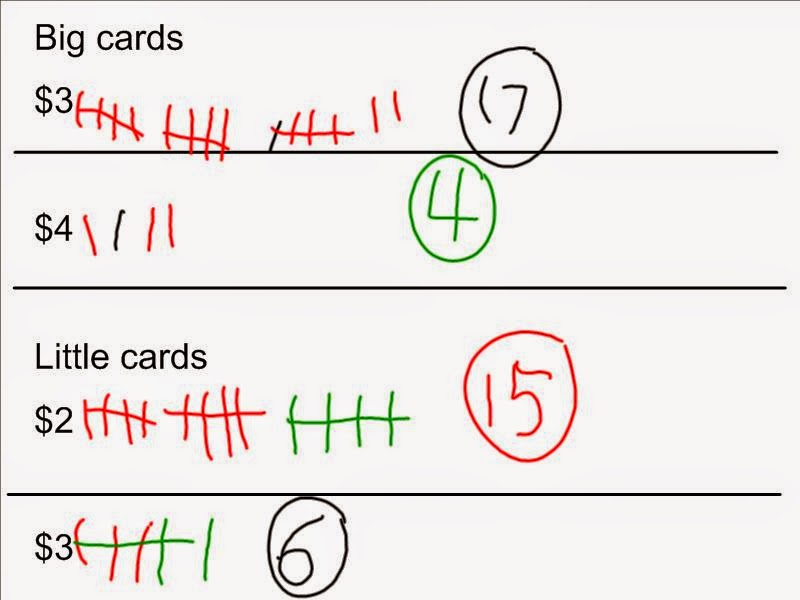
Setting prices was an activity rich in real-life learning. We needed to find out how much people would be willing to pay for little cards, big cards, and magnets.We decided to survey the adults in the school, so we took samples of our products and a clipboard to get the information we needed. Then we collated all our data on the SMART Board.
Because we wanted to ask more people than just the adults in the school, I suggested that we create a survey using Survey Monkey to give us more data for setting prices. We posted the link on my Facebook page and Twitter. After only an hour, we got 12 responses online which we included when we collated our data on the SMART Board. This information made it very clear to the students what prices we needed to charge for the cards.

Last week, we were viewing our Instagram pictures on our SMART Board, and the kids were commenting on how beautiful a lot of them were. One little boy put up his hand and said, "Mrs. Caldwell, our Instagram pictures are so beautiful. I think that we should print them out and sell them and make money for our new playground." And just like that, a new project was born! Why does this always happen at the end of the school year when we have a million and one other things to do? But their enthusiasm was contagious and I agreed that it was a fantastic idea! And when a 6 year-old shows entrepreneurial spirit like that, who am I to stand in his way?
All of our projects are guided by a to do list that is projected on the SMART Board, and our first job was to find out if the playground project still needed money. A quick FaceTime call to the president of Parent Advisory Council confirmed that the project was finished and additional funds were not required. The kids soon came up with two other options: supporting our universal breakfast snack program and/or our brand new child care centre that is set to open this fall.
Our next task was to find somewhere that printed Instagram photographs. I had used both Sticky9 and Prinstagram before, so we visited both websites and did some cost comparisons. In the end, we decided to go with Prinstagram. We decided to order magnets printed with our existing Instagram pictures. This led to some terrific digital citizenship/responsible use learning opportunities as we discussed what pictures we should use and sell. We also discussed our audience and what they would be interested in buying--sorting shapes (probably not), a beautiful blue sky (yes).
With our magnets ordered, we explored the rest of the site and discovered that they also made greeting cards in 4 x 4 and 4 x 6 sizes. The 4 x 4 cards were cheaper, but we wondered if they were too small to go in the mail. My mom is a postmaster and my students know her, so they asked if we could Skype her and ask (hey Mrs. Caldwell, your mom is a post officer. Can we call her and ask?). My mom confirmed the students' suspicions when she said that 4 x 4 were too small to be mailed as standard letter mail, but people could pay extra to have them mailed. My students made the decision to still order 4 x 4 cards as they thought they wouldn't always need to be mailed.
Our discussion of audience and what people would like to see on cards led to the students making the decision to take a lot of new Instagram pictures. They predicted that people from Oak Lake would be interested in pictures of our town and its landmarks. They also thought that everyone likes flowers, so we needed more pictures of flowers. We walked around Oak Lake and photographed whatever struck the students' fancy. I was absolutely amazed by some of the spectacular pictures they shot independently. They also edited and designed collages using a variety of apps, completely independently. Have a look at their work! As you can see, these images are perfect for greeting cards.
Once the greeting cards and magnets were created and ordered, some new tasks had to be accomplished to prepare for our sale. The students named the project #instaawesome and had decided to sell our cards and magnets at Awards Day and Kindergarten Graduation when a lot of people would be in the school. Setting prices for the cards and advertising were two big jobs!
We always set up our to do lists in three columns: task, who will do it, then a check off when done column.
Deciding what organization our profits would support was an important decision. We talked about our two options (new child care centre and our school's universal breakfast snack progam), then I gave students a few minutes to discuss with their neighbour before voting. It turned out that a vote wasn't necessary, as one of my little boys raised his hand and stated, "I think our money should go to the day care. There's little kids in our town and they need to have somewhere good to go so they can learn stuff and be ready for kindergarten." Another little girl added, "And some of us have little brothers and sisters. They need to have a place to go when our moms and dads are at work." Everyone agreed with this logic and it was unanimous that all funds raised would go to the new child care centre on our school grounds. Talk about substantive decision making!
Setting prices was an activity rich in real-life learning. We needed to find out how much people would be willing to pay for little cards, big cards, and magnets.We decided to survey the adults in the school, so we took samples of our products and a clipboard to get the information we needed. Then we collated all our data on the SMART Board.
Because we wanted to ask more people than just the adults in the school, I suggested that we create a survey using Survey Monkey to give us more data for setting prices. We posted the link on my Facebook page and Twitter. After only an hour, we got 12 responses online which we included when we collated our data on the SMART Board. This information made it very clear to the students what prices we needed to charge for the cards.
This slide shows great problem-solving in action! It was a difficult concept for the students, but role-playing actually paying Prinstagram for each card helped them understand that we could not keep all the money for each card and what our actual profit would be.
Next we used shared writing to compose a note to families in our school about our #instaawesome sale that would take place at Awards Day. The students strengthened their scissor skills by cutting the papers in half as there were two notes on each sheet of paper (great opportunity to teach the concept of half).Students decorated the notes, then surveyed each class to find out how many students there were. Printing the numbers on a clipboard to keep track, students were able to count out piles of notes for each classroom, and label them with a sticky note. It was very exciting delivering the notes!


Tomorrow is our card sale. The magnets haven't arrived yet, so we hope to sell those at Kindergarten Grad. Tomorrow morning, we will make a price list, a sign to advertise, set up our display, and practice using the coins to make change. It should be another exciting day of project-based learning in kindergarten!
Thursday, May 22, 2014
Coding in Kindergarten
For the last year, I've been hearing more and more about coding. At first I didn't even understand what people were talking about on Twitter...then I began to have flashbacks to my Grade 11 computer science class where we did computer programming in BASIC computer language! Hour of Code
initiative, with a goal of more than 10 million students trying computer
science for just one hour in school during Computer Science Education
Week in December, caused me to do some research. But I still couldn't fathom how I would use coding in my kindergarten classroom.
My colleague Leah Obach and I had many discussions about coding, and how we could stretch ourselves to make it part of our early years program. We learned that the benefits can be numerous:
-develop critical thinking and problem-solving skills
-expose and engage all students to computer programming before stereotypes exist--it's too hard, computer science is for boys, "geeks/nerds", etc.
-kids aren't afraid and learn quickly at a young age
My colleague Leah Obach and I had many discussions about coding, and how we could stretch ourselves to make it part of our early years program. We learned that the benefits can be numerous:
-develop critical thinking and problem-solving skills
-expose and engage all students to computer programming before stereotypes exist--it's too hard, computer science is for boys, "geeks/nerds", etc.
-kids aren't afraid and learn quickly at a young age
I still wasn't certain how to proceed until I read this Edutopia article, 15+ Ways of Teaching Every Student to Code (Even Without a Computer). It shared some tools for coding with young children that I was excited to try--Tynker and Kodable. Tynker is available online as well as an app (free and paid version). Kodable is available soley as an app, and it also has a free and paid version. So I installed both apps on my students' iPads and decided to give it a try yesterday. I didn't give a lot of introduction to my boys and girls, just explained that we were going to learn how to make animals, people, and objects do things on our devices. Instead of playing games, we were going to learn how to make things happen in games, and maybe someday make our own apps and games.
I decided to try Tynker first, and the students were excited to dive right in. The main problem with Tynker for kindergarten students is that it gives the directions in text format, and doesn't read them aloud. My students are early readers and managed to read some of the basic words, and I read the rest to them. Tynker uses Lego-like pieces that fit together to form a chain of commands that operate the character on the screen (such as walk, jump, repeat, etc). Despite the problem with reading everything independently, my students were very excited to use the Tynker app and were completely engaged for for 25 minutes. I provided support and suggestions as needed, but I really encouraged my young learners to figure things out through trial and error. I also suggested that they could work together if they were really stumped. In our first coding session, I saw some great problem-solving, logical thinking, and basic numeracy/literacy skills in action!
Tomorrow, we will experiment with Kodable, an app that uses a sequence of arrows to move a character through a course. Stay tuned as we compare these two apps for coding with our youngest learners!Monday, May 12, 2014
Exploring the Hundred Chart with Mystery Number Skype
We have used Skype extensively in kindergarten for a number of years, but we have never participated in Mystery Number Skype. After attending Kathy Cassidy's presentation at Awakening Possibilities last month, I was inspired to put this idea into practice with my colleague Leah Obach and her grade 1 class.
How does Mystery Number Skype work? Well it's beyond simple actually! Each class chooses a mystery number based on whatever criteria you have set. We are currently focusing on numbers 1-100 at the moment. The classes then connect on Skype. One class goes first, and asks the other class yes/no questions to narrow down what the mystery number could be. Once the first class guesses the number correctly, the other class takes their turn. McGraw-Hill's Monster Squeeze app is a great way for students to increase their understanding of how to narrow down a range of numbers.
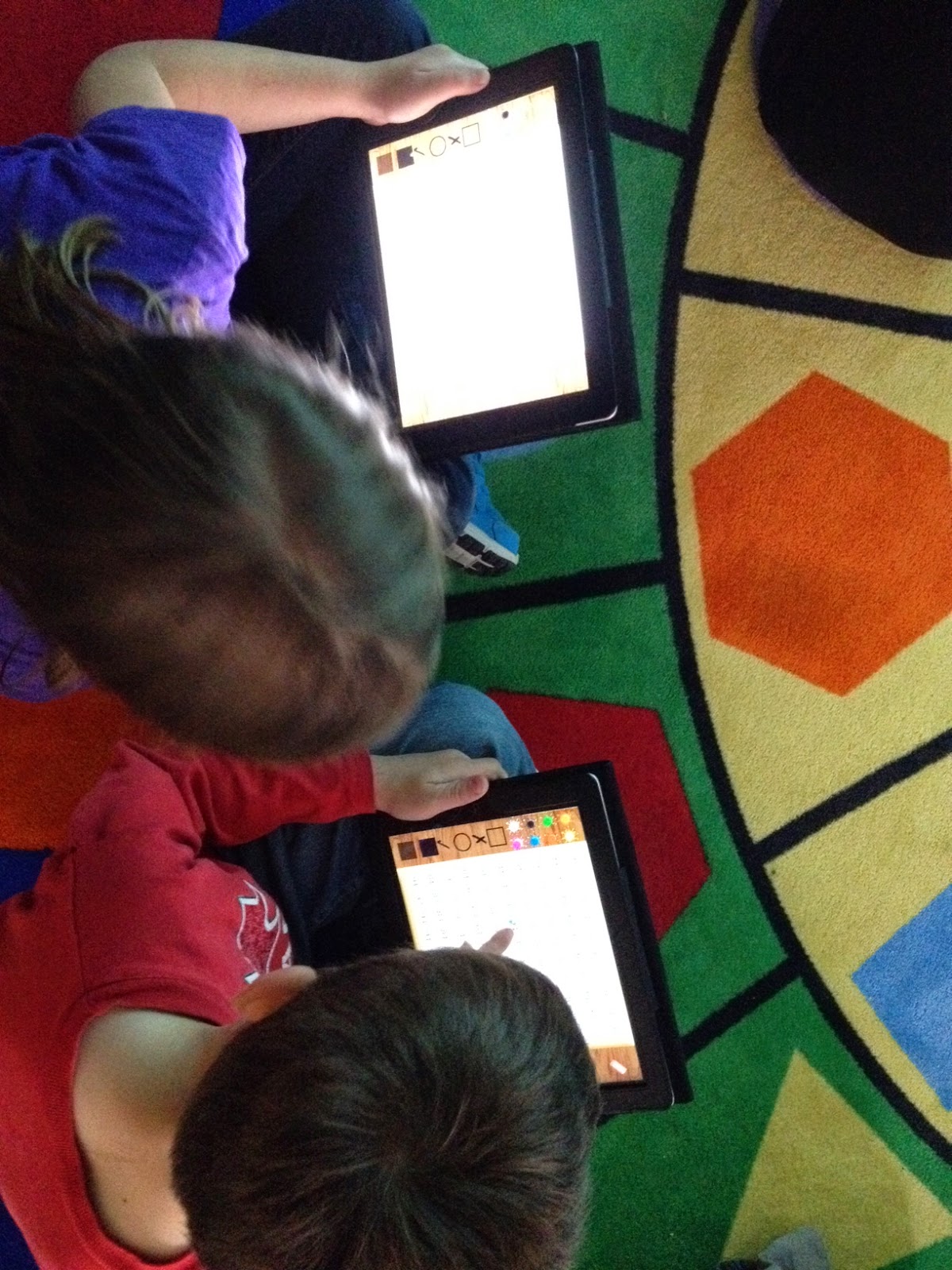
We share the screen and use the interactive hundred grid in SMART Notebook to give both classes a visual. As it is narrowed down, students flip over the numbers. My students each have their own device to use, so we are using the Hands On Math Hundred Chart app. Learn more about how the app works in this tutorial video. Students were super engaged as they asked questions and coloured in numbers on their device during Mystery Skype.
We have done mini-lessons on "smart" questions to ask, and these are the questions we are hearing from our students during Mystery Number Skype:
Is it higher than __?
Is it lower than __?
Is it between __ and __?
Is it in the forties, fifties, sixties, etc.?
Does it end with a __?
After three days of Mystery Number Skype, Leah and I have decided that a few new mini-lessons are needed to stretch the students' thinking and question-asking abilities. Topics we plan to address in the next week include odd/even numbers, skip counting patterns, and the difference between "teen" and "ty" (decade) numbers. Leah's Grade 1 class already demonstrates a good understanding of teen/ty numbers, so her students may actually teach a mini-lesson to my students.
Today our classes competed to see who could solve the mystery number asking the fewest number of questions. We tallied each question on the SMART Board as they were asked, which definitely increased student motivation to ask "smart" questions. This provided another role for students to play during Mystery Number Skype as well as some great skip counting practice.
After only 3 days of Mystery Number Skype, I am really impressed by the growth I've seen in my senior kindergarten students' abilities to use and ask reasonable questions about the hundred chart. Their excitement and engagement is through the roof as well. If you're looking for a fun way to connect with another class and develop 21st century skills in your students while boosting numeracy skills, this is it!
How does Mystery Number Skype work? Well it's beyond simple actually! Each class chooses a mystery number based on whatever criteria you have set. We are currently focusing on numbers 1-100 at the moment. The classes then connect on Skype. One class goes first, and asks the other class yes/no questions to narrow down what the mystery number could be. Once the first class guesses the number correctly, the other class takes their turn. McGraw-Hill's Monster Squeeze app is a great way for students to increase their understanding of how to narrow down a range of numbers.
We share the screen and use the interactive hundred grid in SMART Notebook to give both classes a visual. As it is narrowed down, students flip over the numbers. My students each have their own device to use, so we are using the Hands On Math Hundred Chart app. Learn more about how the app works in this tutorial video. Students were super engaged as they asked questions and coloured in numbers on their device during Mystery Skype.
We have done mini-lessons on "smart" questions to ask, and these are the questions we are hearing from our students during Mystery Number Skype:
Is it higher than __?
Is it lower than __?
Is it between __ and __?
Is it in the forties, fifties, sixties, etc.?
Does it end with a __?
After three days of Mystery Number Skype, Leah and I have decided that a few new mini-lessons are needed to stretch the students' thinking and question-asking abilities. Topics we plan to address in the next week include odd/even numbers, skip counting patterns, and the difference between "teen" and "ty" (decade) numbers. Leah's Grade 1 class already demonstrates a good understanding of teen/ty numbers, so her students may actually teach a mini-lesson to my students.
Today our classes competed to see who could solve the mystery number asking the fewest number of questions. We tallied each question on the SMART Board as they were asked, which definitely increased student motivation to ask "smart" questions. This provided another role for students to play during Mystery Number Skype as well as some great skip counting practice.
After only 3 days of Mystery Number Skype, I am really impressed by the growth I've seen in my senior kindergarten students' abilities to use and ask reasonable questions about the hundred chart. Their excitement and engagement is through the roof as well. If you're looking for a fun way to connect with another class and develop 21st century skills in your students while boosting numeracy skills, this is it!
Learning and Sharing in Spain and Canada
Repost from my contribution to Mindshare Learning Report, May 2014 edition:
In the past two months I’ve had access to some amazing professional learning. Here are some highlights from my travels around Canada and the world!
March started off with a bang when I flew to Barcelona, Spain, with my colleague and best friend Leah Obach, to attend Microsoft in Education Global Forum. This 4-day event brought together 1100 teachers, school leaders, and education leaders from 75 countries. Leah and I were there to share our collaborative project, Little Hands Extended. We attended fantastic keynote sessions, participated in a 24 hour Learn-a-thon where we developed innovative projects with teachers from all over the world, and celebrated at a gala evening. To learn more, view my video and check out the Microsoft Educator Network!
I was home for two weeks, then it was off to National Congress on Rural Education in Saskatoon, SK. My school principal, Brenda Masson, and I presented on our Smart Start Kindergarten program, and took in some terrific professional learning sessions. Highlights included: Jade Ballek and Terry Epp’s session on 21st century learning competencies clearly detailed how their school division is putting pedagogy first. They shared some terrific resources on 21st learning and innovation, connecting through Skype in the Classroom, and using infographics in education.
Kimberly Schonert Reichl’s keynote presentation on educating the heart and mind to develop emotional intelligence shared important connections to academic and interpersonal success. She encouraged teachers to access video resources from the Dalai Lama Centre for Peace and Education, teach mindfulness with the Mind Up! Program from the Hawn Foundation, and infuse social-emotional learning throughout curricula with resources from CASEL.
April brought a fantastic ed tech conference in my home province of Manitoba. Manitoba Teachers’ Society’s Awakening Possibilities gave Leah Obach and I the opportunity to share about project-based learning and the tech tools that support it, while taking in some inspiring sessions. Steve Dembo set the tone for the conference with his keynote message that encouraged teachers and schools to take pride in being first. Dembo stated that cutting edge, innovative teachers and schools are often regarded as crazy but we should wear that crazy label like a badge of honour—the rest will come around soon enough! Dembo also shared some fun and useful tech tools, such as 1 Second Everyday app.
Attending Kathy Cassidy’s session Connected from the Start: Global Learning in the Primary Grades was an excellent reminder of how ICT tools coupled with strong pedagogy create and support digital learners. Blogs, Twitter, and Skype are Kathy’s go-to tools, and digital citizenship is interwoven throughout learning experiences. Mystery Number Skype, blogging to create digital portfolios, movie-making, and shared reading of blog comments/tweets develop important numeracy and literacy skills in Kathy’s Grade 1 classroom. Kathy suggested Edublogs and Kidblog as two great tools for early years teachers interested in blogging with their students.
Other great takeaways from Awakening Possibilities:
* Nadia Nevieri explained how her school has revitalized morning announcements with engaging video announcements. Learn more here!
* Erin Clarke presented on the many uses of Instagram in early years classrooms
* Raman Job shared iPhone photo tips and tools: Haiku Deck for presentations, Snapseed and Tangled FX for editing pics, Touch Blur to protect student privacy, and Quipio and Phonto for creating and sharing text over images (memes/quotations).
Chris Lehmann, founding principal of the Scientific Leadership Academy in Philadelphia, ended two incredible days of learning with a riveting closing keynote. His most important points that I felt compelled to tweet:
* Collaboration means doing things differently because we are doing them together.
* Technology should be like oxygen. Ubiquitous, invisible, and everywhere.
* A vision without a plan is nothing more than a hallucination.
And now comes the challenging part—sifting through all these wonderful ideas and tools and deciding how I will use them to affect change in my classroom and school community! Off to Riding the Wave of Change in Gimli, Manitoba, this week, so stay tuned as I tweet from that conference.
In the past two months I’ve had access to some amazing professional learning. Here are some highlights from my travels around Canada and the world!
March started off with a bang when I flew to Barcelona, Spain, with my colleague and best friend Leah Obach, to attend Microsoft in Education Global Forum. This 4-day event brought together 1100 teachers, school leaders, and education leaders from 75 countries. Leah and I were there to share our collaborative project, Little Hands Extended. We attended fantastic keynote sessions, participated in a 24 hour Learn-a-thon where we developed innovative projects with teachers from all over the world, and celebrated at a gala evening. To learn more, view my video and check out the Microsoft Educator Network!
I was home for two weeks, then it was off to National Congress on Rural Education in Saskatoon, SK. My school principal, Brenda Masson, and I presented on our Smart Start Kindergarten program, and took in some terrific professional learning sessions. Highlights included: Jade Ballek and Terry Epp’s session on 21st century learning competencies clearly detailed how their school division is putting pedagogy first. They shared some terrific resources on 21st learning and innovation, connecting through Skype in the Classroom, and using infographics in education.
Kimberly Schonert Reichl’s keynote presentation on educating the heart and mind to develop emotional intelligence shared important connections to academic and interpersonal success. She encouraged teachers to access video resources from the Dalai Lama Centre for Peace and Education, teach mindfulness with the Mind Up! Program from the Hawn Foundation, and infuse social-emotional learning throughout curricula with resources from CASEL.
April brought a fantastic ed tech conference in my home province of Manitoba. Manitoba Teachers’ Society’s Awakening Possibilities gave Leah Obach and I the opportunity to share about project-based learning and the tech tools that support it, while taking in some inspiring sessions. Steve Dembo set the tone for the conference with his keynote message that encouraged teachers and schools to take pride in being first. Dembo stated that cutting edge, innovative teachers and schools are often regarded as crazy but we should wear that crazy label like a badge of honour—the rest will come around soon enough! Dembo also shared some fun and useful tech tools, such as 1 Second Everyday app.
Attending Kathy Cassidy’s session Connected from the Start: Global Learning in the Primary Grades was an excellent reminder of how ICT tools coupled with strong pedagogy create and support digital learners. Blogs, Twitter, and Skype are Kathy’s go-to tools, and digital citizenship is interwoven throughout learning experiences. Mystery Number Skype, blogging to create digital portfolios, movie-making, and shared reading of blog comments/tweets develop important numeracy and literacy skills in Kathy’s Grade 1 classroom. Kathy suggested Edublogs and Kidblog as two great tools for early years teachers interested in blogging with their students.
Other great takeaways from Awakening Possibilities:
* Nadia Nevieri explained how her school has revitalized morning announcements with engaging video announcements. Learn more here!
* Erin Clarke presented on the many uses of Instagram in early years classrooms
* Raman Job shared iPhone photo tips and tools: Haiku Deck for presentations, Snapseed and Tangled FX for editing pics, Touch Blur to protect student privacy, and Quipio and Phonto for creating and sharing text over images (memes/quotations).
Chris Lehmann, founding principal of the Scientific Leadership Academy in Philadelphia, ended two incredible days of learning with a riveting closing keynote. His most important points that I felt compelled to tweet:
* Collaboration means doing things differently because we are doing them together.
* Technology should be like oxygen. Ubiquitous, invisible, and everywhere.
* A vision without a plan is nothing more than a hallucination.
And now comes the challenging part—sifting through all these wonderful ideas and tools and deciding how I will use them to affect change in my classroom and school community! Off to Riding the Wave of Change in Gimli, Manitoba, this week, so stay tuned as I tweet from that conference.
Monday, April 28, 2014
Instagram in Kindergarten!
Instagram MOM Session from emalkoske
Leah Obach and I had the privilege of sharing Little Hands Extended (project-based learning and the tech tools that support it) at Awakening Possibilities in Winnipeg earlier in the month. We gave our presentation at the Minds on Media session, which featured a number of concurrent presentations in a large room. Erin Clarke was presenting just across from us, and although I was never able to hear her entire presentation, I caught enough snatches of information to capture my interest. Fortunately Erin shared her presentation on her blog, 200 Awesome Days and I have embedded it above.
Instagram was a hot topic at Awakening Possibilities--many people were using it to capture the many amazing sessions at the conference, and many people were talking about how it can improve and support learning in their classrooms. I have used Instagram personally for about a year now, and I find that it fulfills a creative need for me as I edit and share images with friends. But how would I use it in kindergarten? I spent some time researching how Instagram could look in a kindergarten classroom and got some great ideas. I decided that using Instagram in my classroom could help me achieve the following outcomes:
-develop students' emerging writing skills as they caption and hashtag pictures
-create an authentic purpose for writing
-capture and share our learning with parents and other kindergarten classes
-provide an artistic medium for students to express themselves creatively
-to appreciate and share the beauty around them
-learn about other classrooms and geographic regions around the world
-develop an understanding of the world around us as we plot the classrooms we follow on a Bing map
-meet curricular outcomes by participating in challenges such as this one. Thanks Zoe Bettess!
Last week I decided to dive in and use Instagram for the writing component of our guided reading lesson. First of all, I created a private class account, @olcskinders, for my little ones to use. I began by sharing my personal Instagram account with my senior kindergarten students, talking about the kind of pictures I shared, the captions I wrote, and the hashtags I chose. Then I showed them how to take a picture in Instagram, crop it, and use filters. They caught onto this instantly, so I handed out their devices and gave them the job of taking one photograph and returning to the circle. Together we wrote captions and chose hashtags, and the students were so excited with the results of their first Instagram efforts. Together we looked at everyone's pictures, and began to have some discussions about digital citizenship. Who could we take pictures of? Could we use people's names in the caption or hashtag? As I have signed permission forms from all families, here were the rules we came up with to get started:
1) Take interesting pictures that are neat to look at or show our learning.
2) We can only take pictures of the people in our classroom, not the rest of the school.
3) If we want to take a picture of a staff member, we need to ask them first.
4) All pictures need a caption. We cannot use the person's name in the caption or hashtag.
5) We can hashtag our Instagram pictures with our names so people know who took the picture.
I also decided that we would let our students' families follow us, but we would not follow them back (as all content they post may not be appropriate or interesting for kindergarten students).
This morning, we decided to explore a couple of fun apps that Erin Clarke recommended in her Instagram presentation. I was super impressed how quickly my little ones caught on to using Color Splash and making collages! Wow!
My students are already reasonably proficient Instagram users, so what are our next steps?
-continue to develop our ability to write captions and hashtags
-improve our ability to post quality, interesting images
-develop our ability to read and respond to comments on our pictures
-explore apps to enhance our use of Instagram
-implement a rule similar to Erin Clarke's--for every image you post, you must comment on someone else's image
Take a look at some of our first Instagrams!
Leah Obach and I had the privilege of sharing Little Hands Extended (project-based learning and the tech tools that support it) at Awakening Possibilities in Winnipeg earlier in the month. We gave our presentation at the Minds on Media session, which featured a number of concurrent presentations in a large room. Erin Clarke was presenting just across from us, and although I was never able to hear her entire presentation, I caught enough snatches of information to capture my interest. Fortunately Erin shared her presentation on her blog, 200 Awesome Days and I have embedded it above.
Instagram was a hot topic at Awakening Possibilities--many people were using it to capture the many amazing sessions at the conference, and many people were talking about how it can improve and support learning in their classrooms. I have used Instagram personally for about a year now, and I find that it fulfills a creative need for me as I edit and share images with friends. But how would I use it in kindergarten? I spent some time researching how Instagram could look in a kindergarten classroom and got some great ideas. I decided that using Instagram in my classroom could help me achieve the following outcomes:
-develop students' emerging writing skills as they caption and hashtag pictures
-create an authentic purpose for writing
-capture and share our learning with parents and other kindergarten classes
-provide an artistic medium for students to express themselves creatively
-to appreciate and share the beauty around them
-learn about other classrooms and geographic regions around the world
-develop an understanding of the world around us as we plot the classrooms we follow on a Bing map
-meet curricular outcomes by participating in challenges such as this one. Thanks Zoe Bettess!
Last week I decided to dive in and use Instagram for the writing component of our guided reading lesson. First of all, I created a private class account, @olcskinders, for my little ones to use. I began by sharing my personal Instagram account with my senior kindergarten students, talking about the kind of pictures I shared, the captions I wrote, and the hashtags I chose. Then I showed them how to take a picture in Instagram, crop it, and use filters. They caught onto this instantly, so I handed out their devices and gave them the job of taking one photograph and returning to the circle. Together we wrote captions and chose hashtags, and the students were so excited with the results of their first Instagram efforts. Together we looked at everyone's pictures, and began to have some discussions about digital citizenship. Who could we take pictures of? Could we use people's names in the caption or hashtag? As I have signed permission forms from all families, here were the rules we came up with to get started:
1) Take interesting pictures that are neat to look at or show our learning.
2) We can only take pictures of the people in our classroom, not the rest of the school.
3) If we want to take a picture of a staff member, we need to ask them first.
4) All pictures need a caption. We cannot use the person's name in the caption or hashtag.
5) We can hashtag our Instagram pictures with our names so people know who took the picture.
I also decided that we would let our students' families follow us, but we would not follow them back (as all content they post may not be appropriate or interesting for kindergarten students).
Our first Instagram pictures turned out great!
After using Instagram for one day last week, my student teacher and I decided that students needed a word wall to help them print frequently occurring words in captions and hashtags. Miss Anderson did a fantastic job of creating this one!This morning, we decided to explore a couple of fun apps that Erin Clarke recommended in her Instagram presentation. I was super impressed how quickly my little ones caught on to using Color Splash and making collages! Wow!
My students are already reasonably proficient Instagram users, so what are our next steps?
-continue to develop our ability to write captions and hashtags
-improve our ability to post quality, interesting images
-develop our ability to read and respond to comments on our pictures
-explore apps to enhance our use of Instagram
-implement a rule similar to Erin Clarke's--for every image you post, you must comment on someone else's image
Take a look at some of our first Instagrams!
Subscribe to:
Posts (Atom)