Showing posts with label Coding. Show all posts

Friday, December 2, 2016

Hour of Code: A Quick Guide to Coding in Kindergarten

Computer Science Education Week and Hour of Code are nearly upon us. How are you planning to participate in your classroom? Read this Q & A about coding and young children to help you get started! 

What is coding?
-basically, coding is computer progamming. It is when we give directions to a computer to make it do something. Computers exist in many forms (your mobile phone, iPad, washing machine, thermostat, etc) and they all use code to function. 

Why do you teach coding to kindergarten students?
-fun coding apps and activities introduce children to computer science at a young age, before they are intimidated by the idea of "programming a computer"
-coding exposes children to many exciting future career opportunities
-coding develops important skills such as problem-solving, creative thinking, ability to sequence, follow directions, and give directions. These skills transfer over to other subject areas and positively impact young children's overall development. 
-coding promotes tenacity, as children often experience failure and have to persevere to solve coding challenges 

What is "unplugged" coding?
-unplugged coding activities are a great way to begin with young children 
-students don't need to use technology to experience the benefits of coding, allowing you to develop the skills without a lot of additional screen time
-we begin by giving each other oral directions and following them to walk a path around the room or move a bingo chip on a number or alphabet grid 
-we transition to drawing our own code blocks and getting our friends to follow them (more on this later)
-this is an excellent way to build expressive and receptive language skills and students' ability to sequence 

What are your favourite coding tools and resources?
-excellent apps for young learners are Kodable and The Foos 
-both tools are available for multiple platforms and are supported with some good educator resources online
-neither require reading which is important for kindergarten students' success
-in Grade 1, my friend Leah Obach also likes Tynker and Scratch Jr
-some tools can be played online, which makes it easy to project over your computer for collaborative learning and exploration 
-other tools are app-based only, and I recommend airplaying them using an Apple TV or software such as Reflector
-Code.org is a goldmine of information, tutorials, and web-based coding activities (most are too difficult for little ones, but the first few levels can be done together on the SMART Board). 

Once again, Mrs. Obach's class and my kindergarten class are co-hosting a Kids Who Code Code-a-thon at Hamiota Elementary School for Hour of Code. We've been collaborating via Skype to plan this day of coding, and working hard in our classrooms to become experts with our designated apps. Take a look at what we've been doing in kindergarten this week! 

Unplugged coding is this simple! We used three squares on a SMART Notebook slide, then dragged different actions into each box. If we want our friends to repeat the action, we print a number beside it. 
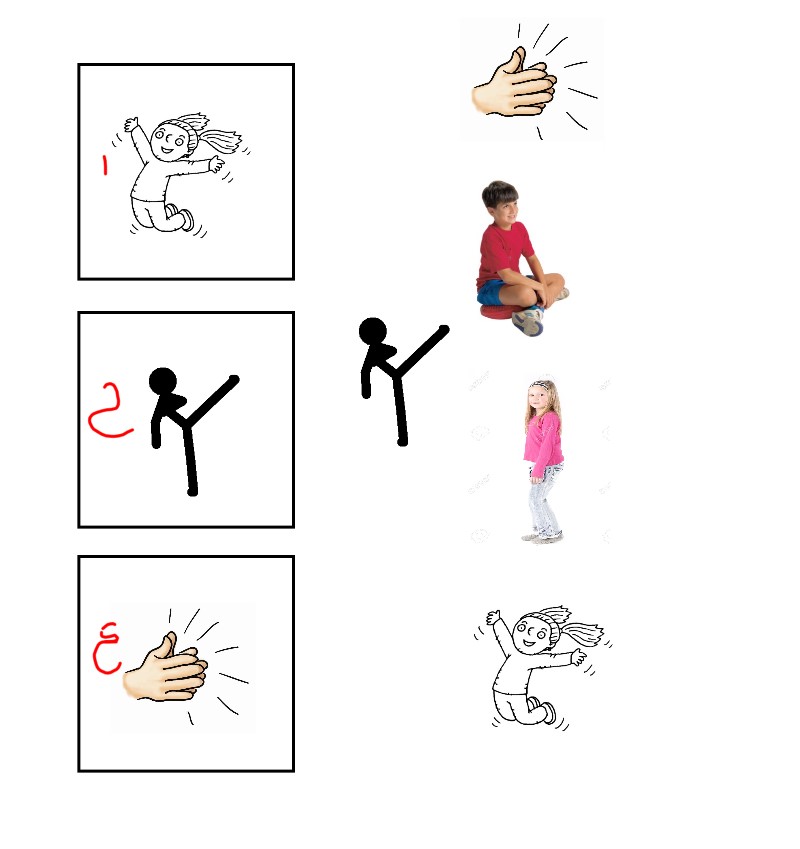
Unplugged coding in action in senior kindergarten

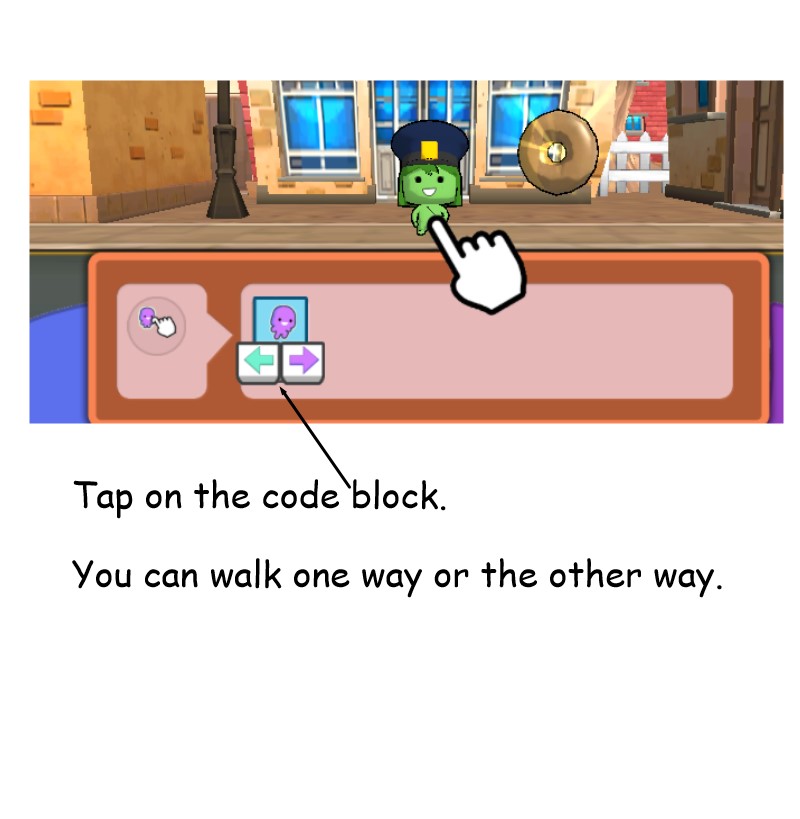
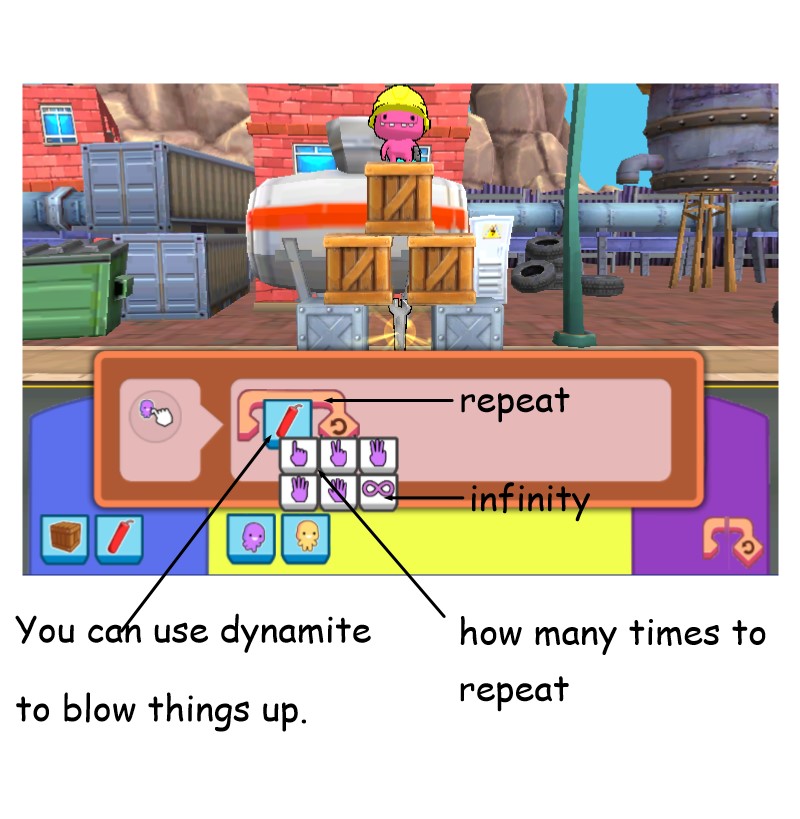
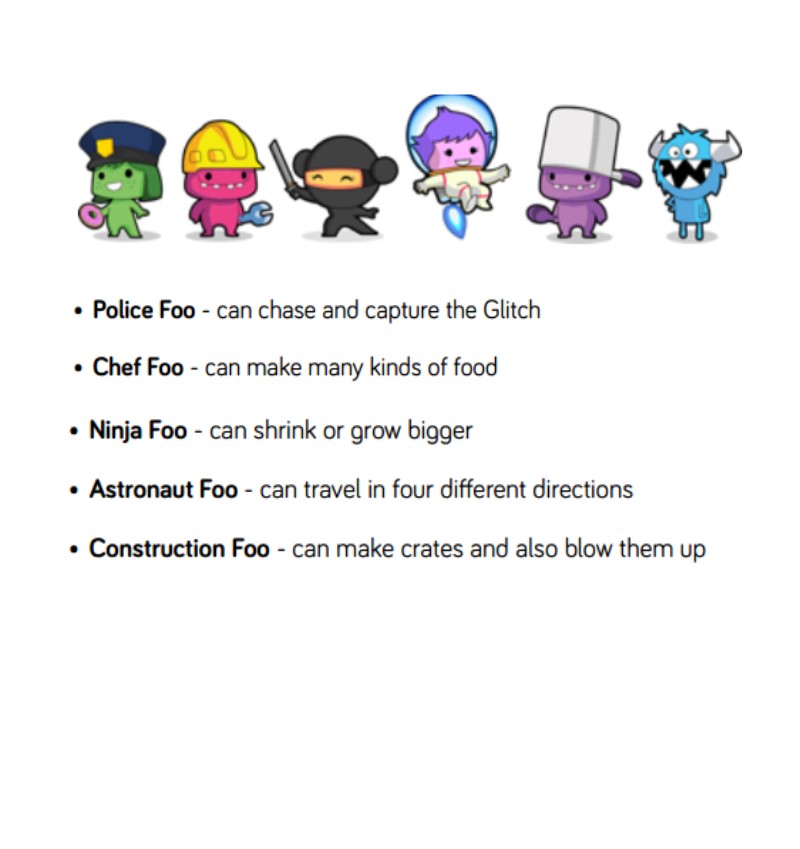
Mrs. Obach and I decided that my kindergarten class would become experts in an app called The Foos. At the code-a-thon, we will teach the Grade 1s and our special guests how to code using this tool. Mrs. Obach's students are in charge of Tynker and Kodable. Here are the simple tutorials we've created in SMART Notebook to teach our friends about The Foos.

The characters:
The coding blocks and how to use them:


Coding and computer programming can sound scary, but it really is this simple. Consider following these steps:
-try some unplugged coding activities as games or movement breaks
-have your students make coding blocks together, and then on their own
-download The Foos and Kodable to your devices (they're free)
-take an hour for you to play around with them (you'll get hooked and not want to stop)
-introduce it to your students by airplaying a device (The Foos is web-based too, although it is a simpler version) and working through a few levels together
-give your students time to explore and play on the devices. You might consider having them work in partners, or creating a coding centre with 4-5 learners at a time.
-come together as a group and discuss any challenges and how to solve them
-there you go, you just did MORE than an Hour of Code!

Good luck, and stay tuned for another post about our Kids Who Code Code-a-thon!

Thursday, November 6, 2014

Kids Who Code Code-a-Thon Meets Project-Based Learning!


My teaching partner and friend, Leah Obach, and I have worked together for a number of years on a variety of learning projects. For the past few years, our collaborations have focused on service-based projects where we have strived to make a difference, both locally and globally. A great deal of rich, real-life learning has taken place, and it has been inspiring to guide our students as they have become change agents in their homes and communities. From selling cookies and iced tea to raise money for the Oregon spotted frog, to planning and executing a Farmer Appreciation Day to thank local farmers, our learners have met curricular outcomes and developed strong 21st century skills.

Leah and I are fortunate to belong to a professional organization that promotes ongoing professional learning through reflective professional practice grants. Manitoba teachers, learn more here! This year, we collaborated with a Winnipeg teacher, Connie Lowe, to develop a new action research project, Kids Who Code. We have wanted to explore coding (think computer science or computer programming) with young children for quite some time as a tool for developing critical and logical thinking skills and highlighting future career possibilities. Today was our first day of officially working on our project, and before we knew it, as so often happens with our work, it exploded into an exciting project-based learning event…Kids Who Code Code-a-thon!

As a kindergarten teacher, I recognized that coding has many exciting possibilities but also some potential stumbling blocks for our youngest learners. Leah and I agreed that her Grade 2 students could play a unique role as mentors, working with my students as they explored a variety of coding tools. As we were working in Hamiota today, we decided to walk over to Hamiota Elementary School and chat with her Grade 2 students at lunch. I posed the question, “Would you be willing to teach my kindergarten kids how to code?” and received an enthusiastic yes! As the students, Leah, and I discussed how this mentoring would take place (via Skype or in-person or a combination of both), someone proposed a coding party….and the Kids Who Code Code-a-thon was born! A quick phone call to my principal, Brenda Masson, ensured her support and a location for our Code-a-thon, which quickly grew into an officially Hour of Code event on Friday, December 12. 

Letting our students take the lead on projects such as this one is key, but as the adult guides we felt it was important to make some “big picture” decisions today. Leah’s class has already agreed to act as mentors, and they will evaluate, select, and prepare learning activities to teach my students about coding tools. My students will take a leadership role in planning the Kids Who Code Code-a-thon at my school. Connie is hoping to host her own Code-a-thon in Winnipeg, where her kindergarten students will mentor other classes in developing coding skills.

So many possibilities and so much creativity energy flowing today….we can hardly wait to get back to our classrooms and get this new learning project underway!

Thursday, May 22, 2014

Coding in Kindergarten

For the last year, I've been hearing more and more about coding. At first I didn't even understand what people were talking about on Twitter...then I began to have flashbacks to my Grade 11 computer science class where we did computer programming in BASIC computer language! Hour of Code initiative, with a goal of more than 10 million students trying computer science for just one hour in school during Computer Science Education Week in December, caused me to do some research. But I still couldn't fathom how I would use coding in my kindergarten classroom.

My colleague Leah Obach and I had many discussions about coding, and how we could stretch ourselves to make it part of our early years program. We learned that the benefits can be numerous:
-develop critical thinking and problem-solving skills
-expose and engage all students to computer programming before stereotypes exist--it's too hard, computer science is for boys, "geeks/nerds", etc.
-kids aren't afraid and learn quickly at a young age

I still wasn't certain how to proceed until I read this Edutopia article,  15+ Ways of Teaching Every Student to Code (Even Without a Computer). It shared some tools for coding with young children that I was excited to try--Tynker and Kodable. Tynker is available online as well as an app (free and paid version). Kodable is available soley as an app, and it also has a free and paid version. So I installed both apps on my students' iPads and decided to give it a try yesterday. I didn't give a lot of introduction to my boys and girls, just explained that we were going to learn how to make animals, people, and objects do things on our devices. Instead of playing games, we were going to learn how to make things happen in games, and maybe someday make our own apps and games. 

I decided to try Tynker first, and the students were excited to dive right in. The main problem with Tynker for kindergarten students is that it gives the directions in text format, and doesn't read them aloud. My students are early readers and managed to read some of the basic words, and I read the rest to them. Tynker uses Lego-like pieces that fit together to form a chain of commands that operate the character on the screen (such as walk, jump, repeat, etc). Despite the problem with reading everything independently, my students were very excited to use the Tynker app and were completely engaged for for 25 minutes. I provided support and suggestions as needed, but I really encouraged my young learners to figure things out through trial and error. I also suggested that they could work together if they were really stumped. In our first coding session, I saw some great problem-solving, logical thinking, and basic numeracy/literacy skills in action!

Tomorrow, we will experiment with Kodable, an app that uses a sequence of arrows to move a character through a course. Stay tuned as we compare these two apps for coding with our youngest learners!