Tuesday, December 17, 2013

Making Your Morning Calendar Truly Interactive

Morning calendar is an important part of the day in many kindergarten classrooms. But in order for morning calendar to be a worthwhile learning experience for kindergarten students, it needs to:
-be directly linked to kindergarten learning outcomes
-develop early literacy, numeracy, and motor skills
-be interactive and engaging
-accommodate different learning styles
-be easily changed to include classroom/seasonal themes and units of study
-be responsive to student interests
 Calendar can take many minutes each day, so as kindergarten teachers with limited time with our youngest learners, we need to make every minute of calendar count!

Years ago, my calendar activities were stapled to a bulletin board. The end of the month meant additional work at the end of my school day as I changed the month, removed the date numbers that had been stuck to the calendar, and created or added activities to match the month/season. And I was always that teacher who got in trouble from workplace health and safety for TOO MUCH PAPER covering the walls and bulletin boards. When I received my first interactive whiteboard in 2008, a digital calendar seemed like a great idea!

My original calendar was sourced from SMART Exchange, and it has evolved over the years. It is a SMART Notebook file with hyperlinks to a variety of web-based tools and activities. There are hyperlinks within the file that direct students to different activities depending on the school day. Our calendar constantly changes to reflect what we are working on in the classroom as it literally takes seconds for me to modify it. Often a learning activity becomes part of calendar for a week or two to ensure daily review of an important concept (a math game on less, more, the same for example). A special helper leads the calendar activities, choosing different students to help for each activity.

Throughout calendar, the students on the carpet are set up with a lap desk, little whiteboard, marker, eraser, and a math mat. This allows the students on the carpet to print the numbers and letters along with the special helper who is printing on the SMART Board. This way everyone is engaged and practicing important skills. Math mats are used to help students follow along during counting activities. I copy each page of the math mat booklet onto a different colour of paper--that way I can say to students, turn to the pink page. It makes it much easier to locate the correct page.

Here's a breakdown of my calendar activities. We DO NOT complete all of these activities each day. I have just included everything that I have created to provide teachers with an idea of the many possibilities! Download my a copy of my calendar here.
1) Selection of special helpers: random word chooser from SMART Notebook gallery is programmed with the names of students. It randomly selects a different helper each day. Once all students have been chosen, I reset it.
2) Attendance: the special helper reads the names of classmates and teachers and slides them over. Throughout the year, last names are added. The helper counts how many students are present and absent and prints the numbers.(skills: word recognition, one-to-one correspondence, counting sequence, number printing). I have linked in my online attendance to this slide which has dramatically improved how often I remember to do my attendance!
3) Calendar: a slide is linked to an interactive calendar on Starfall. It's perfect for young learners and quickly and easily completed. (skills: number recognition, sequencing days/weeks/months)
4) Weather Graph: a simple graph with different types of weather at the bottom is used. Students check the weather outside then slide an infinitely cloned square into the correct column. Columns are counted and compared. (one-to-one correspondence, data analysis, more/less/same, weather)
5) Hundred Chart: patterns are made on a hundred chart to show how many days we have been in school. A variety of coloured semi-transparent shapes are available and infinitely cloned on the side of the calendar. For every decade, a new pattern is created. The special helper counts how many days we have been in school while the other students count on their math mats. All students print the number of days we have been in school. We talk about how many tens and ones are in that number. A YouTube song, "I Can Count to 100" is linked and sometimes we sing and dance to it for a movement break. (skills: patterns, counting to 100, number recognition, number printing, place value)
6) Tally Marks: each day a new tally mark is added. Students practice counting by 5s. A skip counting video is linked to this calendar slide. We might choose to do this song for a movement break instead of the counting to 100 song. (skill: skip counting) These songs are frequently changed to keep the calendar fresh and engaging. When it's only a simple hyperlink, it's easily and quickly done.
7) Letter/Number Printing: the special helper chooses four letters and numbers to print. Together we practice their sounds (letters) and correct formation. Students practice printing them on their little whiteboards. (skills: letter/number recognition, sound production, letter/number printing)
8) Sight Word Practice: depending on the readiness of the group, we might practice Dolch pre-primer sight words using a PowerPoint or video from YouTube. (skill: word recognition)
9) Show and Tell: a digital version of show and tell activities are sometimes included in calendar time. See this post for more information.
10) Morning Message: students sing a song about writing sentences from the Handwriting Without Tears program. Together we share the pen to compose a morning message on the SMART Board. Students print letters and words on their little whiteboards. (skills: early writing behaviors such as letter formation, composing a message that makes sense, spaces between words, punctuation, tracking print, where to start, return sweep)
 
11) RAZ Kids: some days we read a book together online at RAZ Kids (skills: tracking print, high frequency words, early reading strategies as appropriate)
12) Linked activities for different school days: by creating hyperlinks within the calendar file, students can complete different activities depending on the school. This portion of the calendar includes learning activities we have already worked on that still require review and changes frequently.

 I can't imagine returning to a paper calendar on a bulletin board. Calendar is an exciting, engaging, and constantly evolving learning activity in our classroom that students look forward to each day. By using SMART Notebook software and a variety of web-based resources, our calendar is truly interactive!

Assessment: while students complete calendar activities, I assess and document their skills using the Evernote app on a tablet. To ensure student confidentiality, only initials are used. However, Evernote and its many uses are another blog post entirely. To learn about how Leah Obach uses it in her Grade 1 classroom, check out this post!


Thursday, December 12, 2013

'Tis the Season for Gingerbread

Now that Farmer Appreciation Day (with Mrs. Obach's Grade 1 class) and our dinosaur project-based learning have drawn to a close, I felt it was time for something seasonal and simple. So I pulled out some of my favourite Christmas activities featuring gingerbread!

What have we done so far?
ELA: We've read two favourite Jan Brett books--Gingerbread Baby and Gingerbread Friends. After reading the books aloud several times, we really enjoyed watching Jan Brett reading Gingerbread Baby and making gingerbread on YouTube. Next we will work on retelling and dramatizing the story using the character masks available from Jan Brett's website. This photograph shows how absolutely riveted my kids were by the large foldout picture in the back of Gingerbread Friends. They poured over it for a good five minutes!
 Retelling: I modified this learning experience available at SMART Exchange. The story timeline was an excellent tool for ordering when the characters appeared and modelling oral retellings. Once the students were confident in how to retell a story, we made our own gingerbread houses out of paper bags and cut out little cards with the characters on them. We used this tool to do our own retellings to partners and Mrs. Caldwell. I was very impressed with the students' abilities to retell a story. Some even included dialogue from the actual book!
Writing: Our next project will be reading Brown Bear, Brown Bear, What Do You See? and writing our own version, Gingerbread Baby, Gingerbread Baby, What Do You See? The blackline master for the student book is available here.

Numeracy: Using 11 foam gingerbread cutouts from the dollar store, I numbered each one from 0-10. We practiced ordering the gingerbread men to make a number line. Then I set up centres around the room where students had to read the numeral printed on the gingerbread man, then place the correct number of buttons on its chest.

 For the next activity, I turned the gingerbread men face down to show the blank side. I placed a number of buttons on each gingerbread man from 0-10. A white board and dry erase marker was positioned underneath. Students moved from station to station, counting the buttons and printing the corresponding numerals.
We are also enjoying using this app on our iPads...Gingerbread Doodle allows us to pretend that we are baking and decorating a variety of gingerbread treats. And what would a gingerbread theme be without baking real gingerbread men? A parent volunteer is coming in next week for an afternoon of baking!

So there you have it... sometimes it's refreshing to return to the basics amid Christmas time craziness. My young learners have been very engaged throughout these learning experiences while acquiring important basic skills. Merry Christmas and enjoy some well-deserved holidays, teacher friends!

Tuesday, December 3, 2013

Taking Kindergarten into Nature

I was so excited to attend a fantastic professional learning day in Winnipeg with 230 kindergarten teachers, early childhood educators, and other education stakeholders. Entitled Taking Kindergarten into Nature, the day exceeded my expectations and I went home energized and eager to increase the amount of time my young learners and I spend outside! The presenters shared a blog that documents the development and implementation of Sooke School District's nature kindergarten project. Some good resources are included on the sidebar and it's definitely worth a look!

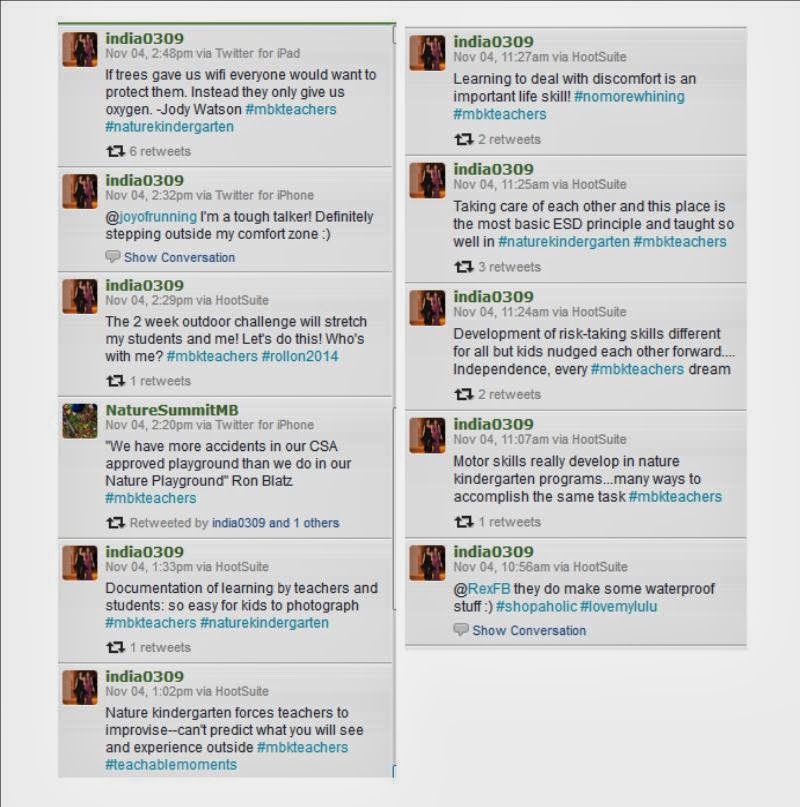
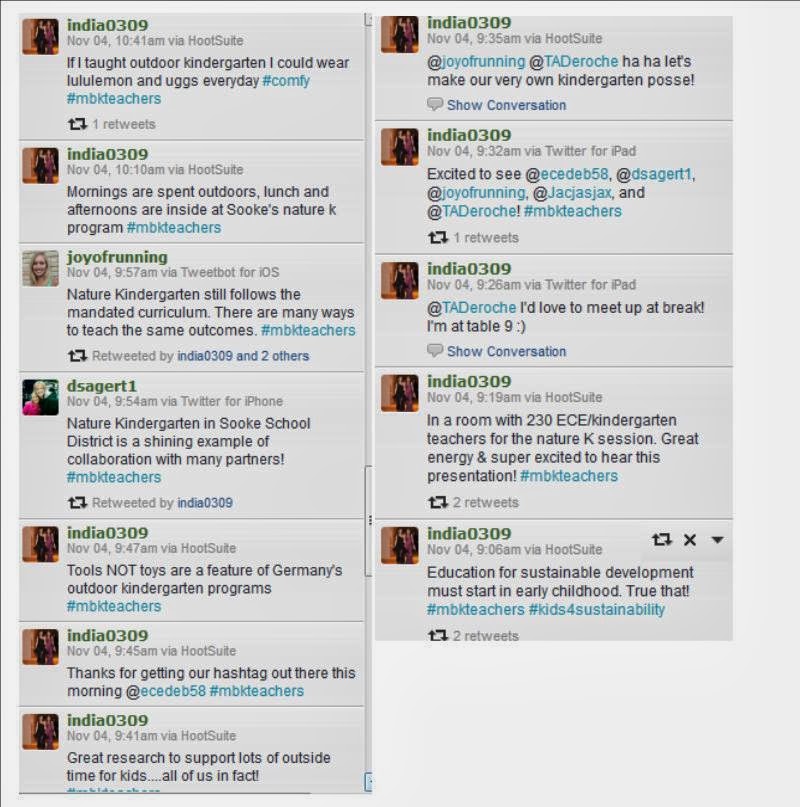
It was also a great day for connecting with some of my favourite kindergarten colleagues, and we had a lively back chat running with the hashtag #mbkteachers. Take a look at some of the tweets I sent as I reflected on and shared my learning throughout the day.


So unfortunately most of us who teach kindergarten in Manitoba don't have access to an amazing forest and beach area like our presenters do for their program. But it's all about scaling nature kindergarten to your own classroom practice! And after some inspiring conversation with colleagues during the day and a two hour ride home to plan, here's what I'm thinking so far:

Maximizing my Learning Gardens/Outdoor Classroom: I am very fortunate to have a door that opens onto our outdoor classroom and learning gardens. There's raised vegetable beds, fruit trees, a pergola with great big rocks for sitting, and a beautiful mural on the school walls. How have I used it so far? Well I've read stories out there, we've had picnic lunches, provided chalk for writing and drawing on the sidewalk, set up my water table there, and taken various other toys outside for play. How can I make better use of this terrific space that is so conveniently located beside my classroom?
-install a chalkboard to make writing materials more readily available to students
-get students more actively involved in gardening (one colleague suggested herb gardens in old tires)
-turn the outdoor classroom into an actual extension of our indoor classroom where students always have the option to read, work, play, etc.

Outdoor Kits/Packs:the presenters talked about how every student has a backpack of supplies that accompanies him/her each day on outdoor excursions. What would I include in an outdoor kit for my students?
-magnifying glass
-clipboard with paper and pencils/markers for documenting learning, making notes, etc.
-iPad or Microsoft Surface in a waterproof/shockproof case would be perfect to capture photographs, create drawings and images. Also mobile devices with the SMART Notebook app would be terrific to enable students to participate in a variety of learning experiences.
-a change of clothes, extra mittens, etc.
-water bottle and snack
-my teacher pack would include tissues, hand sanitizer, baby wipes, cell phone, digital camera,  band aids, and other supplies depending on the day.

Tools Instead of Toys: the presenters raised an excellent point that our kids don't need more toys to enhance play and learning. Instead they need age-appropriate tools that they can use for a variety of tasks. The richest learning usually occurs when students are planning and completing activities that have a very real word purpose, and it only makes sense that we require real tools for authentic learning. 

Venturing Further Afield: within ten minutes, I have access to a pumpkin patch, marshes, and a lake with a beach. If I can organize transportation and obtain board approval to visit these sites, a whole world of learning opportunities open up. There is also lots of green space in our community within walking distance of the school. We just need to get out there and explore!

Take the Two Weeks Outdoors Challenge: I've thrown caution to the wind and signed up for this. Keeping my fingers crossed for great weather this spring :) Are you brave enough to take the challenge? Let me know if you are as it would be great to plan some activities together!

Our First Outdoor Learning Activity: since we were already learning about dinosaurs (see previous blog post here), I planned a learning experience to explore how big the dinosaurs were. Since our classroom wasn't big enough to physically measure out the dinosaurs, going outdoors seemed like a great option. We chose five dinosaurs and used Bing to find out how long they were (check out Bing for Schools--such a great program). Even though Canada uses the metric system, I made the decision to use feet. This would allow us to physically pace out the length of dinosaurs rather than use a metre stick or tape measure (just too difficult for 5 year olds). We looked at the metre stick and talked about how many of our feet made up a metre. Then we printed the numbers to represent how many feet long each dinosaur was.


We printed out the posters we made for each dinosaur (see above), and took them outside with our camera, pylons, and tape.
The kids were thrilled to be learning outside and they kept thinking that they were getting another recess even though they were involved in a structured learning activity. When one little girl looked at me and said, "Mrs. Caldwell, I don't think I've even seen you outside before", it really made me realize that we needed to do more of this!

It was a great opportunity to develop numeracy skills while incorporating bodily-kinesthetic learning styles as we paced out each dinosaur--we all held hands in a line and counted each step out loud. We used pylons to show the head and the tail of each dinosaur and taped our signs to them. This allowed us to make comparisons about the lengths of the dinosaurs.
 This is how long an apatosaurus is!
This picture shows how long the five dinosaurs are that we measured, from longest to shortest.

So our first outdoor learning experience was a huge success. The cool temperatures kept everyone alert, and physically measuring the size of the dinosaurs made the learning experience real to the students in a way that wasn't possible inside. The only way it could be improved upon was pointed out by one student--"Can we have hot chocolate next time?"

So give it a try--bring nature into your kindergarten program. It's nothing revolutionary, it's available to everyone in some shape or form, and you and your young learners might be surprised where it leads you.

Another great resource...
Playing with Sticks: Forest Kindergarten and Nature Play


Tuesday, November 26, 2013

Smarter with Technology: Brandon University, November 22

I had the privilege of presenting to Brandon University's Faculty of Education students last Friday. As always it was a great day, sharing and learning from each other on how to infuse SMART Board technology and SMART Notebook software in the early years classroom!

For student feedback and participation:

Poll Everywhere

Today's Meet (back channel)

Extreme Collaboration (SMART Notebook add on)

In my kindergarten classroom:

Calendar Activities

Early Years SMART Board Activities

More SMART Board Tips and Tricks

SMART Notebook App

Other resources:

Turning a Skype Call into a Learning Call 
Silvia Rosenthal Tolisano, Around the World With Skype

Learning Activity Checklist
 Developed for the Microsoft Peer Coaching Program, now Peer-Ed

Favourite Resources


Thursday, October 10, 2013

Tools to Support Project-Based Learning

If you've read my previous post, Surprise! We're Learning About Dinosaurs!, you'd understand how suddenly project-based learning opportunities can sneak up on you in the early years classroom. Since I wasn't expecting the dinosaur craze to hit today, I went with my go-to strategy--turn it back on the kids, brainstorm a list of what they know already, what they want to find out about the topic/what they can do to help, and how they can get the information they need. It worked well today, and in less than 90 minutes we accessed the school and classroom libraries, Brain Pop Junior, and composed a blog post that tracked our learning. Not bad for being caught off guard by a passel of passionate learners!

Every time I engage in a new learning project, I like to stretch myself as a teacher by bringing in one or two new tools to support the learning in the classroom. What am I thinking for our new dinosaurs project? Here's a few things I'm hoping to use...some tried, true, and tested, others brand new that I'd like to incorporate into my kindergarten program!

Skype in the Classroom is just one of those tools I can't get over. Skype is my go-to for just about everything. I plan to use this great site to connect with another class learning about dinosaurs and/or access a guest speaker--a paleontologist would be absolutely amazing. Or a Skype tour of Royal Tyrell Museum in Alberta would be terrific!
Popplet is a collaborative mindmapping tool that is web-based and available as an app. I heard about it this summer on Twitter as I follow #kinderchat. I think that Popplet will be the perfect tool for tracking, showing relationships among, and sharing our learning. I plan to start with using Popplet on our interactive whiteboard, then download the app to the mobile devices in our classroom. Check out this great interview with Kinder Chat co-founder Heidi Echternacht on the uses of Popplet in kindergarten. 

Microsoft Auto Collage: the pictures are where we're at in kindergarten, and already we've already spent many minutes pouring over gorgeous full-colour images of dinosaurs in many print resources. The students' fascination with pictures of dinosaurs provides a rich opportunity to model ethical and responsible use of images. We'll have a brief lesson about whose pictures we can use and visit Creative Commons together. As a class, we'll search for and download a few dinosaur pictures. Students usually lose interest pretty quickly in this process, so we'll do some together and I usually seek out the rest on my own. Once we have a bank of dinosaur pictures, we'll use Microsoft Auto Collage to create our own dinosaur collages to showcase our learning--students will generate their own topics, but I anticipate collages showing meat eaters, plant eaters, etc. This will also be a great time to teach students about the importance of generating their own images--by molding dinosaurs out of clay and photographing, drawing/painting dinosaurs and photographing, or using an app such as Draw and Tell or even good old Microsoft Paint! Auto Collage is available at Partners in Learning Network, so be sure to join for access to many free resources and a worldwide community of educators!

 As always, we'll share our learning and seek out collaborative partners through social media. We try to tweet regularly as @olcskinders and we post daily on our classroom Facebook page (it's a secret group). Read these past posts to learn more about how I use social media in kindergarten! Tips and Tricks for Tweeting in Kindergarten  The New Face of Parent Engagement

And who knows what directions we'll take next week as we continue to learn about dinosaurs. Our first priority will be to read dinosaurs books and keep track of important facts as we learn to use Popplet. As with all project-based learning in kindergarten, it's the students who are driving the bus! I'm just keeping it safe, purposeful, and pointed in the right direction!


Surprise! We're Learning About Dinosaurs!

My boys and girls came in from recess, engaged in a very serious debate. How did the dinosaurs die? Could I please “esplain” it to them because everyone had different ideas. 15 minutes ago, no one had cared about dinosaurs so I was kind of surprised. But I gathered the boys and girls on the carpet and asked them to tell me all the different ideas they had been discussing. Most of their thoughts focused around the Ice Age and too much ice and snow for the dinosaurs to live.

Their enthusiasm was contagious, so I made the decision that my perfectly planned lesson on pumpkins and their life cycle could wait for another day! I began by asking them where we could go to learn more about dinosaurs and answer our questions. They suggested the computer, YouTube, and Brain Pop. One student said we should ask the older kids in our school because they might know. A little boy said we should look in books. So as a starting point, we went to the library and chose about 20 books that looked just right for a kindergarten classroom. Next, we started on a KWL
.
What do we know about dinosaurs?
-t-rex dinosaurs eat meat
-some dinosaurs were plant eaters
-some dinosaurs were meat eaters
-some dinosaurs lived in the water and some lived on land
-some scientists think a big meteor hitted the earth and killed some dinosaurs. Some scientists think the dinosaurs died with a big snowstorm and then  it was really icy.
-some dinosaurs killed other dinosaurs
-dinosaurs are extinct
-some dinosaurs bite themselves
-triceratops was a kind of dinosaur
-pteranodons ate fish

What would we like to know about dinosaurs?
What are the names of some dinosaurs?
What did dinosaurs eat?
What kind of plants did dinosaurs?
Were there dinosaurs in Manitoba? What kind of dinosaurs lived in Canada?

We were so excited to explore the new books!

Friday, September 27, 2013

Project Based Learning: A Road Map for Success in Early Years

 
For a number of years, I have been an enthusiastic proponent of project-based learning in early years. Our collaborative project Little Hands, Big World (with colleague Leah Obach) has been an ongoing series of multidisciplinary, student-led learning experiences--many with an environmental/sustainability focus. So what have I learned that could make your journey into project-based learning smoother?
 
It can't be forced. The real-life problem or issue needs to come from the students themselves. I’ve tried to bring my ideas to the students because I see terrific learning opportunities, but both the students and I have felt a lack of enthusiasm and reliance on the teacher’s lead. The best projects have arisen from an issue that is very real to the students, easily observed, and directly impacting their lives. Our Hopping to Help project began with a student bringing a frog for show and tell!
 Be willing to step back and let students do the heavy lifting. It is so tempting to do the work yourself—after all, you can do it ten times more quickly than your students, right? But the most authentic learning comes from students determining and executing the important steps of the project. When we are immersed in a project, we begin every day with a class meeting and generate/modify our to-do list. Referred to throughout the day, it sets an intense focus as all tasks are essential and laden with rich learning! Occasionally the students and I decide that a task is best completed by an adult but they are part of that decision.
 Engagement and enthusiasm run high. Managing it can be challenging. In kindergarten, learners are in different places with self-regulation. When students are truly immersed in a project and taking ownership for its success, their energy can be boundless. Channeling it requires careful management, clear expectations, redirection, and reinforcement. Students can quickly be brought back on task when they are reminded that they have a very real job to complete that is crucial to the project’s success.

Make a difference while building important skills. Project-based learning requires risk-taking. Things won’t go perfectly, the learning will be messy, and your classroom will be even messier. However, the benefits are numerous and often immeasurable. The synergy, sense of purpose, and making a real difference while meeting learning outcomes and developing 21st century skills can be addicting-- you and your students will be planning your next project as the previous one draws to a close!

*This post was orginally published on Microsoft Partners in Learning Hot Topics blog. View the original post here .