Friday, September 27, 2013

Project Based Learning: A Road Map for Success in Early Years

 
For a number of years, I have been an enthusiastic proponent of project-based learning in early years. Our collaborative project Little Hands, Big World (with colleague Leah Obach) has been an ongoing series of multidisciplinary, student-led learning experiences--many with an environmental/sustainability focus. So what have I learned that could make your journey into project-based learning smoother?
 
It can't be forced. The real-life problem or issue needs to come from the students themselves. I’ve tried to bring my ideas to the students because I see terrific learning opportunities, but both the students and I have felt a lack of enthusiasm and reliance on the teacher’s lead. The best projects have arisen from an issue that is very real to the students, easily observed, and directly impacting their lives. Our Hopping to Help project began with a student bringing a frog for show and tell!
 Be willing to step back and let students do the heavy lifting. It is so tempting to do the work yourself—after all, you can do it ten times more quickly than your students, right? But the most authentic learning comes from students determining and executing the important steps of the project. When we are immersed in a project, we begin every day with a class meeting and generate/modify our to-do list. Referred to throughout the day, it sets an intense focus as all tasks are essential and laden with rich learning! Occasionally the students and I decide that a task is best completed by an adult but they are part of that decision.
 Engagement and enthusiasm run high. Managing it can be challenging. In kindergarten, learners are in different places with self-regulation. When students are truly immersed in a project and taking ownership for its success, their energy can be boundless. Channeling it requires careful management, clear expectations, redirection, and reinforcement. Students can quickly be brought back on task when they are reminded that they have a very real job to complete that is crucial to the project’s success.

Make a difference while building important skills. Project-based learning requires risk-taking. Things won’t go perfectly, the learning will be messy, and your classroom will be even messier. However, the benefits are numerous and often immeasurable. The synergy, sense of purpose, and making a real difference while meeting learning outcomes and developing 21st century skills can be addicting-- you and your students will be planning your next project as the previous one draws to a close!

*This post was orginally published on Microsoft Partners in Learning Hot Topics blog. View the original post here .

Thursday, September 19, 2013

From First Steps to Digital Footprints: Developing Digital Citizenship in Our Youngest Learners

 Most children enter kindergarten as technology users, but their knowledge of how to use it safely and appropriately varies as widely as their abilities to print their names and tie their shoes. As their first teachers, it is unquestioningly our duty to develop digital citizenship alongside scissor skills and sharing.
Collaborative, project-based learning experiences provide many authentic opportunities for students to acquire and practice digital citizenship skills that will see them safely into adulthood as they begin to develop and manage their first digital footprints. In Manitoba, we have a Literacy with ICT Developmental Continuum that fosters critical and creative thinking skills as students learn to use ICT safely and responsibly. How does this actually look in kindergarten?

We can use technology to share our learning with others and learn from others. Skype in the Classroom connected us with a classroom in New Jersey when we were learning about frogs. For more information, check out these blog posts: Frogs     Skype in Kindergarten

We can self-regulate as we use technology. Modeling and guided practice goes into growing self-regulating learners in kindergarten. We practice how to behave in front of the web cam, posing thoughtful questions that no one has asked yet, and thinking about what we know and want to learn.

We can use technology safely and responsibly. We used Twitter in kindergarten to challenge other classrooms and share results in our litterless lunch competitions. Students gained experience in what information is appropriate and safe to share as well as password security.

We need permission to use someone else’s music, images, and ideas. We frequently make movies to share and celebrate our learning. We understand that we can’t use popular songs off the radio in our soundtrack. Tools such as Songsmith are a copyright-free way to generate our own music.

These simple understandings provide a strong foundation for digital citizenship. Regardless of the students’ age, it’s never too early or late to begin. There’s no doubt that digital citizenship is the 21st century version of “plays well with others” and our students’ future success will depend on it.

*Originally written for Partners in Learning Network Hot Topics, September 18, 2013. View the original post here.

Sunday, September 8, 2013

Fresh, Shiny, and New

So year-end craziness in May and June combined with two months of summer fun has been hard on my blog. But it's a brand new school year and I'm excited to share what's been happening in my classroom. I'm also planning to post on some exciting project-based learning that occurred in June in my K room, leaving me far too busy to document it at the time.

This is my sixth year of teaching kindergarten, and every year I refine my start up procedures. The first week is under my belt, and I was really pleased with how smoothly everything went. I am teaching a combined junior and senior kindergarten program again, and I have 15 four year-olds and only 5 returning five year-olds. With 75% of my students and their parents being new to the program and classroom, it was more important than ever to explain things clearly and make sure everyone understood the procedures and routines in my classroom.

It only makes sense that your first contact with a family should be a positive one. At the beginning of August, I mail out a welcome letter for the child, a kindergarten handbook for the family, and a school supply list. I also add new parents to our classroom Facebook page, and give last year's families a couple of weeks' notice that I will be removing them from the page.

This year, my welcome letter was printed on pink paper and contained a handful of pink feathers. Parents reported that it was a big hit with their children!
 Tickled Pink welcome letter
Kindergarten Handbook
My kindergarten handbook has been a work in progress for years--it's been added to and changed ever since I taught Grades 1 and 2. I conference with all families the day before kindergarten begins, and the first thing we do is review the handbook together. It gives me a wonderful opportunity to make sure everyone understands rules, procedures, and expectations, and I can answer any questions.

Parent/Child First Day Booklet
When families drop in for their conference, they bring their child and his/her school supplies. They complete this booklet together, touring different areas of the room. Then they sit down, enjoy a snack, and meet with me. First we go through the school supplies, making sure that the child's name is written on every item. Then the child puts them away in his/her cubby, with me assisting as needed.

Conference Checklist
This conference checklist guides our discussion. I review every point on the checklist with parents, then give them the checklist to take home.

Remind 101
This year, I asked all parents to bring their mobile phones to the pre-kindergarten conference. I added everyone to Remind 101, an app that allows me to text everyone at once. I think it's going to be great for quickly getting the word out and reminding parents of classroom happenings.

Overgram
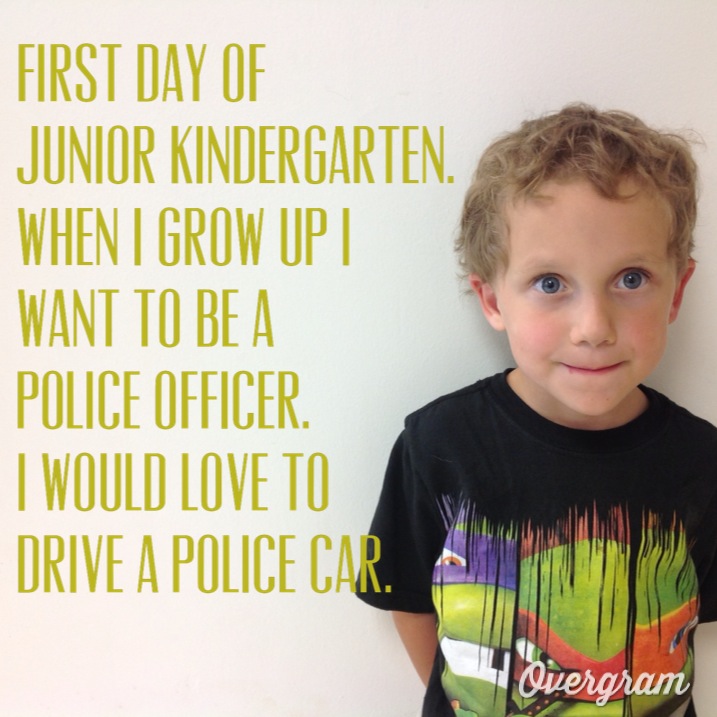
I always take the traditional first day of school pictures of my kindergarten kids. Last year, they each held up a sign saying, "First day of junior/senior kindergarten 2012". This year, I decided to take the pictures with my iPad and use Overgram to add text. The parents and I were thrilled with the results. Thanks to the families who agreed to let me share these! Have a look....


Who doesn't think that teaching kindergarten is the best job in the world? One look at those adorable faces, so full of promise, confirms it for me. Here's to another great school year ahead!

Wednesday, May 1, 2013

Mindshare Learning's 21st Century Digital Classrom Video Challenge: A Look Back

A couple of weeks ago, I was contacted by Robert Martellacci of Mindshare Learning. He asked if I would be interested in giving a video interview for the May edition of the Mindshare Learning Report, reflecting on my technology journey and how winning their video contest two years ago had impacted my classroom practice. I was thrilled to talk to Robert again about the amazing opportunity afforded to my students and me by Mindshare, and in preparing for the interview, I went on this walk down memory lane....

In February 2010, I watched an amazing video created by Kathy Cassidy and her Grade 1 class. It was an award-winning entry in Mindshare Learning's 21st Century Digital Classroom National Video Challenge. Mrs. Cassidy and her students won $15 000 worth of technology prizes and professional learning, and I was inspired to enter the contest the following year.

I eagerly watched for the contest announcement. It was my first year of teaching a combined junior and senior kindergarten class, and I had made some changes in the ways I was infusing technology to support student learning. My students and I decided on a "Goodnight Moon" theme. We brainstormed a list of all the technology tools that helped us learn, then filmed a movie of us saying goodnight to each of them. The students explained how we used these tools to communicate, collaborate, problem-solve,and think critically and creatively. After an entire day devoted to editing and narrating, we had a movie that we were very proud of!
What tools did we use?
-a digital camera
-Microsoft Photo Story. Join the Microsoft Partners in Learning for access to great free tools for creating movies!
-Freeplay Music for a copyright-free soundtrack

In mid-January, I was meeting with my principal in her office, and our administrative assistant knocked at the door. She said there was someone on the phone for me. and she thought it might be about that video contest my class entered. With great trepidation, we took the call on speaker phone. After a brief chat with Robert Martellacci, he shared the exciting news--Goodnight 21st Century Learners had been selected as the Central Canadian prize winner. $15 000 of technology prizes and professional learning were on their way to Oak Lake Community School's kindergarten classroom! It was definitely the most exciting moment of my teaching career at that point, and I didn't hesitate to throw a party to celebrate with my friends and family after school!

We had so much fun posing for our picture for the official press release. We went with the theme of "We're 4 and 5 Going on 21...21st Century Learners" and dressed up as what we would like to be when we grew up.
It was like Christmas that spring as prizes from a variety of donors arrived by mail and courier. My classroom were the lucky recipients of:
-a huge SMART Board with a short drop projector
-SMART Response system (early years version)
-Front Row Lasso classroom amplification system
-Dell netbook
-Flip video camera
-year's subscription to Discovery Education
-professional learning sessions from Blossom Learning
-year's subscription to Net Trekker
-all-expense paid trip to the ISTE in Philadelphia

Two years later, we still use all of these tools on a daily and weekly basis. Our SMART Board is in constant use, as is my Front Row Lasso system. We engage in a variety of collaborative projects through Skype, Twitter, and Xbox Video Kinect, and the SMART Board and Front Row system greatly enhance these collaborations. Our Flip video camera has proven to be the perfect size for little hands, and it has been used to create countless videos sharing our learning.

But the best was still yet to come...an all-expense paid trip to the ISTE in Philadelphia in June! Through the generous support of our school board, my principal Brenda Masson was able to attend with me. We left on the weekend so that we could have a couple of days of touring and sightseeing, then attended the conference Monday-Wednesday. Although I had attended a Microsoft Global Forum before with 500 participants, I had never attended a conference of this magnitude! The most exciting moment was when we checked out the displays on our first morning. We found the Mindshare Learning booth and what did we see? Goodnight 21st Century Learners projected on a big screen, and my kindergarten students' cute faces smiling down from a banner!
 Over the course of the conference, Brenda and I attended some terrific sessions. We also spent quite a bit of time in the vendor displays, entering lots of draws, collecting the free giveaways, and learning about so many amazing products and services. Some of my favourites were:
Front Row: I made a great connection with Front Row at the ISTE that has evolved into my role as a teacher advocate for Front Row!

Brain Pop and Brain Pop Junior: I continue to love this wonderful video and educational resource site. The new Game Up! and Educators' Community have enhanced this already terrific site, and I was so excited to meet Dr. Kari Stubbs of Brain Pop in Prague at the Global Forum in 2012. Brain Pop very generously gave a free subscription to every educator at the Global Forum.

Reading Plus: this web-based tool builds fluency and reading comprehension in students from Grade 3 and beyond. This company provided us with training and a complimentary 6-month free trial. We absolutely loved Reading Plus and saw significant gains in our students' reading abilities. Sadly we were not able to afford a subscription the following year.

Learn to Be Healthy: this subscription site provides health education resources (videos, learning activities, etc.) for K-12.

As fantastic as the conference was, the absolute highlight was Mindshare Learning's Award Reception held jointly with the Canadian Consulate on Tuesday, June 28. The venue was beautiful--Philadelphia's Union League. When Brenda and I were touring on our first day, we passed the Union League building. Our tour guide shared that it was one of the United States' most exclusive clubs, occupying an entire city block with hotel, restaurant, and function rooms, and that most people would never see the inside of it. When we saw Robert at the ISTE and he told us that the Awards Ceremony was being held at the Union League, Brenda and I were beyond excited. We also decided that the dresses we brought we not fancy enough for an evening at the Union League and straight to the stores we went!
 Philadelphia's historic Union League building, Abraham Lincoln Room, was the scene of the reception
 The Canadian Consulate jointly hosted the reception with Mindshare Learning, and the Canadian Consul presented our awards.
Only one of the winning videos was shown at the reception. It was an extremely special moment when Goodnight 21st Century Learners was shown to the large crowd!
Receiving our awards and posing with the Canadian Consul, president of ISTE, and Robert Martellaci
The evening ended on a patriotic note when the crowd gathered and sang O Canada in both English and French. In honour of our location, we also sang Star Spangled Banner. It was a touching moment! Check out Mindshare Learning's Flickr photostream of the event.

As detailed in my video interview, winning the Mindshare Learning video challenge, receiving so many great tools, attending the ISTE, and the many great connections I made as a result have had a profound impact on my classroom practice. I would highly encourage every classroom teacher to enter this video challenge. Whether you're a winner or not, examining your classroom practice and sharing it with others is always an excellent opportunity for professional growth!


Wednesday, April 10, 2013

The New Faces of Parent Engagement: The Impact of Facebook and FaceTime in a Kindergarten Program

I teach in a small rural school, and more than half of my students arrive and depart by bus everyday. So how do I maintain strong communication with parents when I rarely see them face-to-face? I send home a monthly calendar, and you may have read past posts about using clipboards with weekly sheets and Twitter, but my quickest and easiest tool for disseminating information quickly is Facebook! After posting daily to my classroom Facebook group for two years now, I've gleaned a few tips that I'm happy to share with you.

Facebook Group or Facebook Page?
There are some differences between Facebook groups and pages. Basically, a group is for a smaller number of people to communicate and the group administrator has control over privacy and membership. A page shares information among a broad group of people, and its content is public. I have created a "secret group" that is only visible to the members that I've added. Follow these links to learn more:
Facebook Group Basics 
Privacy Options for Groups

Where to Begin?
I was the first teacher in my division to start using Facebook with parents, so there were some growing pains to get started. I would recommend getting permission from your principal, ICT consultant, and superintendent, and informed consent from parents. I introduced the idea of a classroom Facebook group at my pre-kindergarten conferences in September, and I explained it in person to each parent. I stressed that it would be set up to share information and resources with parents. If anyone had a major concern, Facebook was not the forum for airing it (phone call, meeting, or private message please). After nearly two years, it has worked wonderfully well and I follow the same procedure at the beginning of each school year.

Use Lists to Avoid Getting Too Up Close and Personal
Setting up a classroom Facebook group does require that I am Facebook friends with all my kindergarten parents. This has not posed a problem (I have a fantastic group of parents), as I have simply created a "kindergarten parents" list in Facebook. This allows me to control my privacy settings and make sure that they only have access to the content I want them to see. With each status update and uploaded photograph, I can easily decide if my kindergarten parents will see it. For example, pictures of their child's teacher having a blast at the wine festival can easily be hidden from their news feed!

Who is part of the group?
The only members of our secret kindergarten group are my current parents/caregivers and any student teachers that I have that year. If my principal were on Facebook I would include her as well. Every September, I remove the previous year's parents from the group, and add the new parents after my pre-kindergarten conferences.


What is posted in our group?
 -daily updates and reminders posted by the teacher: return your library book/home reading books, it's music today, send back permission forms, etc.
-what we are learning about: sharing details about lessons and important skills we are practicing
-links to online resources and games that might be of interest to parents
-links to apps that we are using on the classroom iPads if parents would like to download them at home
-pictures of bulletin board displays, crafts, work samples, etc.
-uploaded presentations from parent nights/literacy events
-kindergarten handbook and supply lists
-movies/social stories that the students or I have created for easy home viewing

-occasionally parents post information about sports' teams or kids' events in the community
Creating Facebook Events and Asking Questions
I often use the event tool to invite parents to conferences, Kindergarten Graduation, and concerts. It gives me an idea of how many to expect, and again--that information is right there for them in their Facebook account.

Occasionally I use the "ask a question" in the status box to poll parents on new ideas or dates. For example, I created a poll to find out how parents felt about me purchasing all the school supplies and charging them a flat fee in the fall. The feedback was excellent and helped me to decide how to approach school supplies for September 2013.

Parent Engagement
Updating our page in real time throughout the day is so quick and easy with my smart phone and iPad, and parents love knowing what is happening in the classroom by checking their Facebook account throughout the day. I also believe that it improves parent-child communication. When parents are picking up their children or visiting with them after school, parents are able to ask about specific events from the day. For example, "What did you think of those new plasma cars in your classroom?" or "I hear that you learned how to print teen numbers today. Why don't you show me how to do it?" is going to lead to a much richer discussion and sharing than the age-old, "How was school today?"   
 I would highly recommend this form of communication to any classroom teacher. Parent engagement is extremely high in my classroom because they all feel so involved. It is very rare that a parent tells me that they didn't know about something. And last minute messages are easy to share with parents--and the counter attached to each post lets me know who and how many parents have seen it.

Another important face in kindergarten...FaceTime!
I make use of my iPhone a great deal in the classroom to enhance parent communication. All of my parent contact information is saved in my iPhone, so it is a snap to text, call, and FaceTime parents when the occasion calls for it. I take the opportunity at pre-kindergarten conferences to enter all their information into my laptop on iCloud which syncs it with my iPad and iPhone. Regardless of the situation, I always have one of my devices with me and can contact parents easily.

How do I use my smart phone in kindergarten?
-I regularly photograph children at centres or completing a craft/work sample and text the picture to parents. Parents are always thrilled to see what their children have been doing at school, and it can be really motivating for children to know that when he/she has completed a task, a record of it can be sent to mom or dad. 

-and, once the picture is taken on my iPhone or iPad, it can easily be uploaded to the student's Evernote portfolio (but that's a whole new blog post)
-all parents have my cell number and know that they can text me at anytime and I will respond (some of my colleagues don't agree with this, but I have had no problems. I've found that by responding immediately to parent questions, little concerns don't have the chance to turn into huge problems).
-we use FaceTime (video calling) for separation anxiety and illness (i.e. how sick are you really? If mom sees you she can decide).

So why not consider getting face-to-face with the most important people in your students' lives? As long as you operate within the parameters of your school division/district's policy, obtain informed consent from parents, and exercise good judgment when using social media, you have nothing ahead of you except more involved, engaged parents!

Thursday, April 4, 2013

The Smarter Start...Our Junior Kindergarten Program


Description of OLCS Junior Kindergarten model:
·         My school is designated a community school by Manitoba Education's Aboriginal Education Directorate. What does it mean to be a community school? Read more here.  
  • A big part of being a community school is being responsive to the needs of the community, and our junior kindergarten program was developed from a desire to make our school more ready for our youngest learners. Our pre-school population was impacted by limited pre-school programming, low EDI scores in the area of social-emotional development, and delayed fine motor skills. Our school is a small rural school, and our average kindergarten class ranged from 10-15 students. This left room to expand our 5 year-old program to include 4 year-old students in the same classroom.
  • Three years ago, "Smart Start Junior and Senior Kindergarten" was born! We created a combined classroom of junior (4 year-old) and senior (5 year-old) kindergarten students. SK students attend half-time (full alternate days) and JK students arrive at noon on these alternate days. Starting in April, JK students attend full alternate days.
  • Our program targets early literacy and numeracy skills, gross and fine motor development, as well as social-emotional development. The Roots of Empathy program specifically targets social-emotional competencies and the development of empathy at a young age. Earlier access to clinical services (occupational therapy, physiotherapy, and speech language) is built into the program, and our clinicians spend time in the classroom observing students, working with small groups, making instructional recommendations, and encouraging referrals to specific therapies when appropriate.
  • Brandon University student teachers are a valuable component of the program, providing an extra set of hands in the classroom. Our school division has agreed to provide educational assistant support for the 2013-14 school year.
Qualitative Data
Parents shared the following comments about the strengths of the JK program:
-the technology part is a huge hit with the girls, as well as the themes (pirates, restaurant)
-I found that all of her skills improved dramatically by the end of the year- especially relative to children not exposed to JK. She also liked watching the baby develop (Roots of Empathy program) and I feel she learned a great deal from this opportunity.
-letting the kids get a head start is such a great idea
-I really liked the structure and routine. The communication about what was happening was really good as well. The Letterland and reading programs seemed to be really good. He really enjoyed the music program as well.
-it gave children many new varieties of learning and play. I feel my child will be very ready for kinder. It is a great way to transition children into kindergarten!  Wonderful program.
-my child is prepared for the kindergarten year. She knows what to expect from school, the bus, the teachers, and she was able to learn the new skills she will need next year from someone other than boring old mom.
-activity centers, theme parties
-it gives the kids the opportunity to get that little jump on school that lots of them are ready for
-very well-organized, great communication between the teacher and the parents, flexibility about attendance options (ie: full days being optional.), use of technology in the classroom. I loved that it gave my child the opportunity to learn things he may not have otherwise learned until Kindergarten without any pressure or unrealistic expectations on him.

Quantitative Data:
  • A four year-old screening is conducted for all students entering the program using the DIAL-3 instrument. This data is compared to the scores collected at five year-old screenings.
  • Although we are in the process of collecting data, some conclusions can already be drawn. Students who participated in the JK program (2010-11) had the highest five year-old scores ever recorded at Oak Lake Community School. Out of 11 students, nine students scored in the 90th percentile or greater (overall readiness).
End of year surveys administered to JK parents indicated the following:
·         100% of parents stated that their child always enjoyed attending JK.
·         88.9% of parents felt that their child demonstrated growth in letters, letter sounds, and rhyming words
·         77.8% saw growth in numbers, patterns, and counting
·         100% saw growth in cutting, colouring, and printing skills
·         66.7% saw growth in running, hopping, and physical coordination
·         100% saw growth in confidence and friendship skills
·         89% of families rated the JK program as excellent, 11% of families rated the program as very good.
·         Of the families who chose full day attendance (April-June), 66% of families felt it worked “really well” for their child, 11% felt that it worked “okay”, and 22% of families did not access the full day option.

First term assessment data from Senior Kindergarten shows that:
·         90% of students are meeting/exceeding outcomes in ELA and mathematics.
·         Transition from Junior to Senior Kindergarten was seamless. Academic learning took place from the first day of Senior Kindergarten as all rules/routines/procedures were well-established.
·         SK students are demonstrating a readiness for reading instruction much earlier in the year than has ever been observed.
·         Parent engagement is very high.

 Junior and Senior Kindergarten Handbook

Junior Kindergarten Supply List

Staying Organized with Clipboards as Communication Tools


Tuesday, March 26, 2013

Tips and Tricks for Tweeting in Kindergarten

While sipping my morning tea and scrolling through my Hootsuite account this morning, a Winnipeg kindergarten teacher whom I follow posted a tweet saying that she was interested in using Twitter in her classroom. Have a look at some of our conversation:
This brief conversation made me reflect on how and why I've been using Twitter in kindergarten. Before using Twitter, I got my feet wet with blogging. I first began blogging in kindergarten in November 2008 after returning from the Microsoft Partners in Learning Global Forum in Hong Kong. I had connected with some amazing teachers who blogged, and blogging seemed like a great way to share what was happening in my classroom and stay in touch with teachers around the world. The teacher who had the biggest impact on my classroom practice with blogging was Kate O'Connell (now Kate Murray). In 2008, Kate was a teacher at Scoil Mhuire in Kilvemnon, Co. Tipperary, Ireland. Her students blogged the adventures of a school mascot, Piggly, who had travelled to the Global Forum in Hong Kong with her. Take a look at some posts from 2008 chronicling the adventures of Piggly in Hong Kong! Kate and I decided that if my classroom got a mascot, we would communicate through our blogs. It was a wonderful project, and our mascot Barkley the Beaver became a beloved member of the kindergarten class.

My kindergarten students were very enthusiastic about our classroom mascot, but composing blog posts as a shared writing activity was painful at times. Even with me acting as a scribe/keyboarder, it was a challenge to our brief attention spans. When I heard about Twitter in 2009, I decided that "microblogging" with 140-character tweets might be just the tool we were looking for. We created a Twitter account, @olcskinders, and began looking for other early years classrooms to follow. The students loved checking Twitter, and composing a number of short tweets throughout our day worked perfectly!

Based on what I've learned in the past few years, here's some Twitter tips and tricks for tweeting in kindergarten.
Use Twitter yourself: the best way to become proficient in using Twitter is by creating your own professional or personal account. Twitter is an amazing tool for professional development and building your own professional learning community. The best way to get started is to visit the Twitter page of another kindergarten teacher, take a look at who they follow, and follow anyone who looks interesting! 

What should you tweet about? Share links to great online resources, ask questions or post a plea for suggestions/resources, retweet tweets that you found interesting, share what you've been reading professionally, funny anecdotes from your day in kindergarten...really, just about anything that other teachers would find useful or amusing! When you're participating in professional learning, it's a great idea to paraphrase important points from the speaker, reflect on what you have heard, and share recommended resources--this scales up the impact so that hundreds and maybe even thousands of people can benefit!

Use a Twitter client: I find the Twitter site to be very limiting in terms of functionality, so I use a Twitter client such as Hootsuite.  Hootsuite can be accessed online (just set up an account and allow access to your Twitter account) or downloaded as an app to your smartphone or tablet. Hootsuite has default streams, such as sent tweet, mentions (very useful to know who is talking about you on Twitter), direct messages, etc. You can also customize Hootsuite and add your own streams, such as hashtags used for conferences or discussion groups  (#kinderchat and #mbkteachers are great ones to follow). To learn more about hashtags, check out this video tutorial.

A word of warning: using a Twitter client for your professional account is invaluable. However, I find that when I project my kindergarten account on our SMART Board, the Hootsuite interface is WAY too busy and confusing for kindergarten students. We always use the plain old Twitter website when reading and sending tweets!

Finding Other Kindergarten Classes to Follow: becoming involved in a professional learning community such as #kinderchat or #mbkteachers will give you access to lots of kindergarten teachers. It's easy to send a tweet saying, "Looking for other K classes to follow and share with on Twitter. Who's interested? #mbkteachers #kinderchat". Or, visit my classroom Twitter account, @olcskinders, and follow any of the classrooms that look like a good fit for your students.

Involving Parents: It's a good idea to inform parents that you will be using Twitter in your kindergarten classroom. Explaining the educational value of such a tool is key for parents to understand that this isn't a waste of classroom time! Here's a link to the note I send home to parents explaining why we use Twitter. The note also contains some video tutorial links and step by step instructions to create their own account so they can become involved with our classroom on Twitter.

How does it look in kindergarten? We usually check our kindergarten Twitter account as part of our morning calendar routine. Our entire calendar is done on the SMART Board in a Notebook file, so it is super easy to include a hyperlink to our Twitter account. We read tweets from other K classrooms and reply as often as we can to encourage dialogue. We write tweets detailing what we will be doing for the day and share links to online games and videos we enjoyed. Other times, we ask questions based on what we are learning (Who would like to share a two-element pattern with us? Who knows what colour red and blue make?), share products we have made (such as our latest Animoto video) or pose a math problem of the day. Some classrooms post Google forms to fill out to collect information (on other communities for example) to enhance their learning.

Composing tweets: We compose tweets in one of three ways...
1) Teacher as scribe/keyboarder: this is the quickest way to get something on Twitter. The students generate the message while I type it. I pause and ask students to supply initial/medial/final sounds and spell simple sight words. Sometimes I talk about starting the sentence with an uppercase letter, leaving a space between words, and choosing the correct punctuation. We re-read the message and make sure it makes sense, then a student presses "tweet" on the SMART Board.
2) Student as keyboarder: sometimes the students do the actual typing while we work together to generate a message. In these instances, I use the pop up keyboard on the SMART Board (you can customize it to display in ABC order, qwerty, or using uppercase/lowercase letters). I often help the student by typing the tricky letters or words while he/she types familiar sounds and sight words. If you are working with a projector but not an interactive whiteboard, plugging in a keyboard such as the Kinderboard from Bridges is a great option! Manitoba teachers: Contact Andrea Marginet at Manitoba Education's Rural and Northern Assistive Technology Lending Library. She can hook you up with a kinderboard to trial in your classroom!
3) Student as scribe: other times, students and I share the pen on the SMART Board, using Notebook software, to compose our message. This gives us an opportunity to practice letter formation and other writing conventions. When our message is complete, we export it as a JPEG file and upload it to Twitter. Tip: supply the other students in the class with little whiteboards and markers. Have them write the message with you so that everyone is busy and engaged!

Mapping outcomes with Google Maps:  There are a few mapping outcomes in Manitoba's social studies curriculum. Discussing and plotting the locations on a map of our Twitter friends is a great way to infuse social studies into our daily tweeting. My students and I created a map using Google Maps that we update as we follow new classrooms. The students find it interesting to calculate how long it would take to drive to the school of a classroom we are following on Twitter! We often take a minute to use Google Street View to check out the school and do a quick internet search to learn about their geographic location and climate.

Using picture files on Twitter: as previously mentioned, SMART Notebook files can be converted to JPEGs and uploaded to Twitter. To give your Twitter followers a window into your classroom, it's very easy to snap a picture with your smartphone or iPad and upload it directly to Twitter. Whether it's an art project, a science experiment, or a pattern that has been created, by snapping a picture it can shared with your followers around the world in seconds. Working with your students to attach a brief tweet to the picture that reflects on the learning takes it to the next level. Just a word of caution: only include student images if you have informed consent from parents and you are operating within the parameters of division policy!

Develop digital citizenship from a young age: using Twitter in the classroom gives you the perfect opportunity to teach ethical, responsible, and safe use of technology and social media. Hopefully lessons learned in kindergarten will prevent cyber bullying and some of the dangerous behavior we hear about in the news! Manitoba Education developed the Literacy with ICT continuum in 2005, and it contains many relevant descriptors for using technology safely and responsibly in the early years. When appropriate, I include the following in our Twitter use:
1) Let's enter our username and password. What is a password? Who can we share it with?
2) Our Twitter friends want to know about us and where we live. Should we use our first and last names on Twitter? Could we give them our home phone numbers? Why would that not be a good idea?
3) Let's share what we've been doing in our Dr. Seuss unit. It would be fun to show a picture from the book Green Eggs and Ham because we just read it. But is that our picture? Did we draw it? Is it okay to share something that we haven't made ourselves?

Twitter Resources and Tools
Kinderchat: the original kindergarten Twitter discussion! Visit this site for Twitter tips and tricks, discussion archives, and information about upcoming projects. It's a gold mine of information for the tweeting K teacher.
Eight Useful and Fun Twitter Tools: some great ones here, and they're all new to me!
Twit Longer: when you're too chatty to contain your message to 140 characters!
Twitter Gets an A+ in Kindergarten Classroom


When infused into your classroom practice, Twitter can provide a wealth of opportunities to meet curricular outcomes and Literacy with ICT descriptors. In 140 characters, it brings the world into your classroom and shares learning with a huge audience. My classroom would love to tweet with yours--please don't hesitate to follow us at @olcskinders. And if you're tweeting professionally about kindergarten practice, please use the hashtag #mbkteachers in your tweets. Happy tweeting :)